The X-Robots-Tag is an HTTP response header that gives search engine crawlers indexing instructions, such as noindex or nofollow, for a URL. It does the same job as the robots meta tag but works for any file type — including PDFs, images and videos — and can be applied to many URLs at once through server configuration.
On this page
What the X-Robots-Tag looks like
It is sent by the server as part of the response headers:
HTTP/1.1 200 OK
Content-Type: application/pdf
X-Robots-Tag: noindex, nofollow
Common directives
- noindex — do not show this URL in search results.
- nofollow — do not follow the links on this page.
- none — equivalent to noindex, nofollow.
- nosnippet — do not show a text snippet or video preview.
- max-snippet:[number], max-image-preview:[none|standard|large], max-video-preview:[number] — limit preview size.
- noimageindex — do not index images on the page.
- notranslate — do not offer a translation in results.
- unavailable_after:[date] — stop showing the URL after a set date.
You can target a specific crawler, for example X-Robots-Tag: googlebot: noindex.
X-Robots-Tag vs meta robots tag
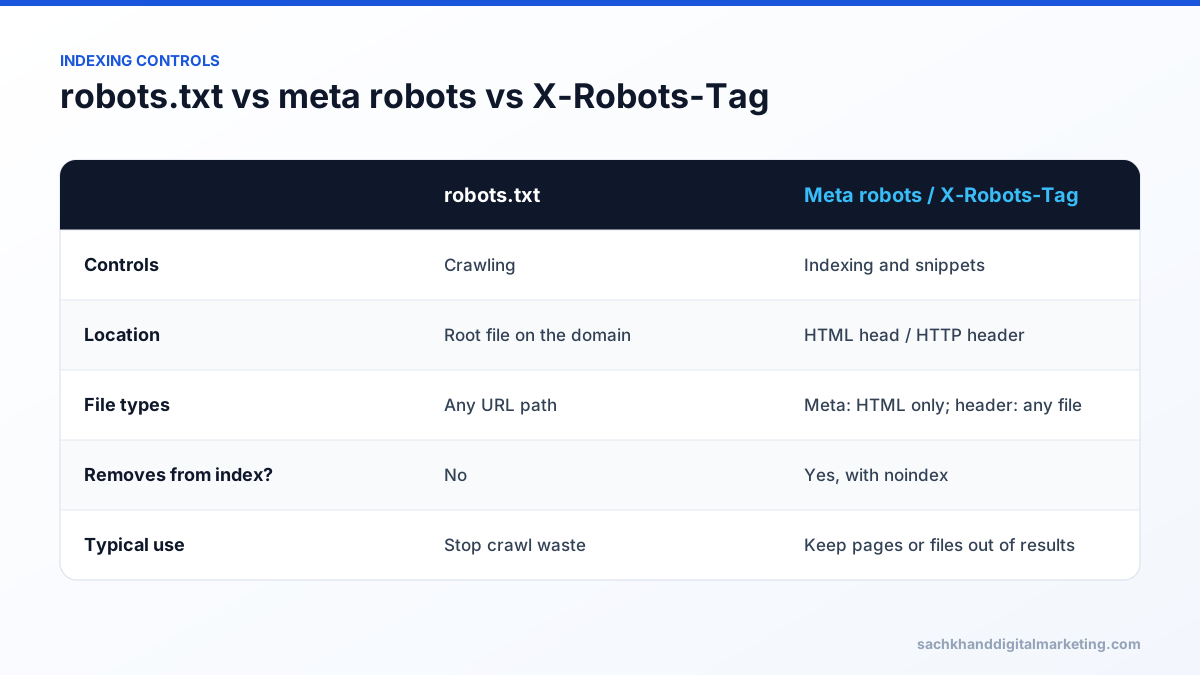
The meta robots tag sits in a page’s HTML <head>, so it only works for HTML pages and has to be added page by page. The X-Robots-Tag lives in the HTTP header, so it works for any file type and can be set by rule — for example noindexing every PDF in a folder. Search engines treat the directives the same way; if both are present, the most restrictive instruction applies.
Examples by server
Apache (.htaccess) — noindex all PDFs:<Files ~ "\.pdf$"> Header set X-Robots-Tag "noindex, nofollow" </Files>
Nginx:location ~* \.pdf$ { add_header X-Robots-Tag "noindex, nofollow"; }
IIS (web.config) — add a custom header under <httpProtocol><customHeaders> for the folder you want to exclude.
Common mistakes
- Blocking the URL in robots.txt as well. If crawlers cannot fetch the URL, they never see the noindex header, and the URL can still appear in results.
- Leaving a site-wide noindex from a staging server after launch — one of the most damaging and common technical SEO errors.
- Not checking. Use the URL Inspection tool in Google Search Console or your browser’s developer tools to confirm the header is sent.
Common X-Robots-Tag use cases
| Use case | Example header |
|---|---|
| Keep PDFs out of search results | X-Robots-Tag: noindex on .pdf files |
| Hide a staging site | X-Robots-Tag: noindex, nofollow on every response (plus password protection) |
| Remove a page after an event date | X-Robots-Tag: unavailable_after: 2026-12-31 |
| Prevent image indexing for a folder | X-Robots-Tag: noimageindex |
| Limit snippet length | X-Robots-Tag: max-snippet:50 |
How to check a URL’s headers
- Command line:
curl -I https://example.com/file.pdfshows response headers, including any X-Robots-Tag. - Browser developer tools: open the Network tab, reload, select the request and view Response Headers.
- Google Search Console: URL Inspection shows whether indexing is allowed and why a URL is excluded.
- SEO crawlers: most report X-Robots-Tag directives across a whole site.
Step by step: noindex all PDFs
- Confirm the PDFs are not blocked in robots.txt, so crawlers can see the header.
- Add a server rule that sends
X-Robots-Tag: noindexfor files ending in .pdf. - Test a PDF URL with curl or developer tools.
- If the content is also available as an HTML page, link to the HTML version instead.
- Monitor Search Console until the PDFs drop out of the index.
Mistakes to avoid
- Applying a site-wide noindex rule during development and forgetting to remove it at launch.
- Adding noindex headers to pages you want ranked because a server rule matched too broadly.
- Using noindex and a canonical tag pointing to another page at the same time, sending mixed signals.
- Expecting noindex to protect confidential files; use authentication for sensitive content.
Directive reference
| Directive | Effect |
|---|---|
| all | No restrictions (the default) |
| noindex | Do not show the URL in search results |
| nofollow | Do not follow links on the page |
| none | Same as noindex, nofollow |
| nosnippet | No text snippet or video preview |
| indexifembedded | Allow indexing when embedded via iframe despite noindex |
| max-snippet:[n] | Limit snippet to n characters |
| max-image-preview:[setting] | none, standard or large image previews |
| max-video-preview:[n] | Limit video preview to n seconds |
| notranslate | Do not offer translation of the page in results |
| noimageindex | Do not index images on the page |
| unavailable_after:[date] | Stop showing the URL after the date |
AI crawlers and the X-Robots-Tag
Snippet controls such as nosnippet and max-snippet also affect how Google can use content in AI features like AI Overviews. Restricting snippets can reduce visibility in both classic and AI results, so apply them only where there is a clear reason. Controls for AI training crawlers are generally handled separately in robots.txt using each crawler’s user agent.
Frequently asked questions
What is the X-Robots-Tag used for?
It is used to control indexing through HTTP headers, most often to noindex non-HTML files like PDFs or to apply indexing rules to many URLs at once.
Is the X-Robots-Tag better than the meta robots tag?
Neither is better; they do the same job. Use meta robots for individual HTML pages and the X-Robots-Tag for non-HTML files or rules applied at server level.
How do I check a page’s X-Robots-Tag?
Open your browser’s developer tools, go to the Network tab, reload and inspect the response headers, or use URL Inspection in Google Search Console.
Can I use X-Robots-Tag and robots.txt together?
Yes, but not on the same URL. If robots.txt blocks crawling, search engines cannot see the X-Robots-Tag header, so a noindex directive will not be applied.
Want experts to handle this for you?
Our specialists turn these fundamentals into rankings, leads and revenue. Start with a free, no-obligation audit of your site.