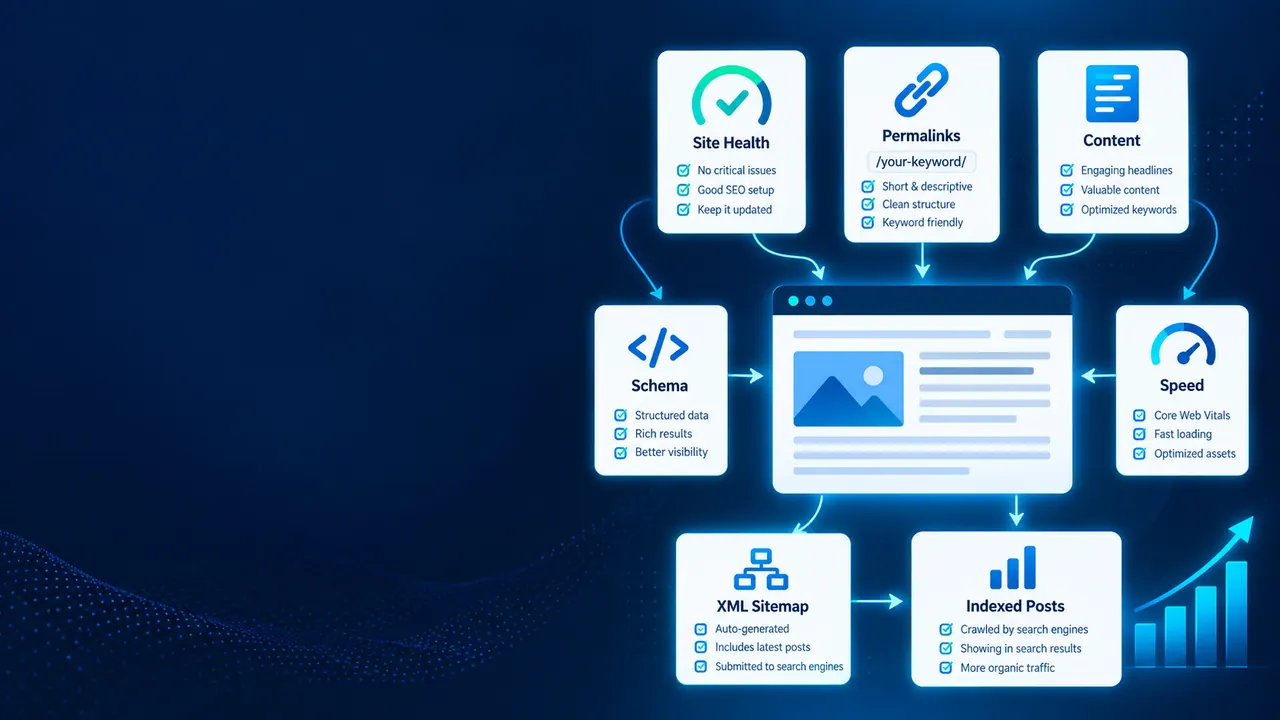
WordPress SEO Services at a glance
Our WordPress SEO services lift the platform ceiling first — theme and plugin bloat, WordPress speed optimisation, Core Web Vitals and crawl control — then configure Yoast SEO or Rank Math properly. WP SEO services that work in the codebase, not just the plugin settings.
Get a free audit →- WordPress speed optimisation
- Yoast SEO & Rank Math setup
- Core Web Vitals
- Plugin & theme audit
- Schema markup
- Content SEO
Fix the platform ceiling first. Then the content can actually rank.
WordPress SEO is two distinct jobs. The first is removing the technical ceiling the installation has accumulated — plugin overhead, theme payload, indexation defaults, database bloat. The second is the standard on-page and content work, which only produces results once the ceiling is gone.
Most agencies skip straight to the second job. That is why sites receive months of content work with no ranking movement: the pages are fine, but the site cannot pass performance thresholds and half the crawl budget is spent on tag archives nobody will ever read.
- 30+ accumulated pluginsMinimal, audited stack
- All archives indexableDeliberate indexation rules
- Page-builder bloatCritical CSS, deferred JS
- Templated meta titlesIntent-engineered titles
- Generic plugin schemaValidated rich-result markup
- Flat tag soupTopical cluster architecture
On a typical mature WordPress site, removing plugin and theme overhead plus fixing indexation produces more ranking movement in six weeks than the previous year of content publishing did.
- Plugin audit and consolidation
- We identify what each plugin actually costs in queries and assets, remove duplicated functionality, and replace heavy plugins with lighter equivalents or small code additions.
- Indexation control
- Tag, author, date, attachment and paginated archives configured deliberately rather than left at defaults — usually reclaiming a large share of wasted crawl budget.
- Core Web Vitals remediation
- Critical CSS, deferred and unused JavaScript removal, image formats and dimensions, font loading, and server-level caching configured properly.
- Schema beyond plugin defaults
- The structured data your pages actually qualify for, validated — not the generic Article markup an SEO plugin emits on every URL.
- Content architecture
- Keyword-to-URL mapping, internal linking clusters and category structure rebuilt so the taxonomy supports rankings instead of diluting them.
How we rebuild a WordPress site for search
Six stages, technical ceiling first, so that content work compounds instead of being wasted.
Full stack audit
Plugin-by-plugin cost analysis, theme payload measurement, database health, hosting configuration and a full crawl. You get a ranked list of what is actually holding the site back, with measured impact against each item.
What’s included
- Hosting, theme and plugin review
- Technical SEO and site speed audit
- Content and keyword opportunities
You receive: A complete WordPress SEO audit
Plugin consolidation
Remove duplicated functionality, replace heavy plugins with lighter alternatives, and move simple features into theme code. Done on a staging environment with regression checks, never live.
What’s included
- Duplicate and heavy plugins removed
- One SEO plugin configured correctly
- Security and site speed improved
You receive: A lean WordPress plugin stack
Core Web Vitals work
Critical CSS, unused JavaScript elimination, image conversion and sizing, font loading strategy, object and page caching, and CDN configuration — measured against field data, not lab scores.
What’s included
- WordPress theme and plugin speed fixes
- Image, font and script optimisation
- Caching configured for WordPress
You receive: Faster page speed on mobile
Indexation cleanup
Decide deliberately which archives, taxonomies and paginated series belong in the index, then implement it. On content-heavy sites this typically removes thousands of thin URLs competing with real pages.
What’s included
- Thin, duplicate and tag pages removed from the index
- Canonical and noindex rules fixed
- XML sitemaps cleaned up
You receive: A WordPress indexation cleanup
Content architecture
Keyword-to-URL mapping, cannibalisation resolution, category restructuring and internal link clusters so the site’s taxonomy concentrates authority rather than scattering it.
What’s included
- Topic clusters and pillar pages in WordPress
- Clean categories, tags and URL structure
- Internal links between related posts
You receive: A WordPress content architecture plan
Schema & maintenance
Validated structured data beyond plugin defaults, plus a maintenance protocol so plugin updates and new content do not silently reintroduce the problems we just removed.
What’s included
- Structured data for posts, products and FAQs
- WordPress and plugin updates checked for SEO
- Ongoing technical monitoring
You receive: A WordPress schema and maintenance plan
Get a free audit →We work in the codebase, not just the plugin settings
Most WordPress SEO work stops at configuring an SEO plugin. The problems that actually cap rankings sit in the theme, the plugin stack and the hosting layer.
Developers, not just configurators
We modify themes, write custom functions and replace plugins with code where that is lighter. Real WordPress performance work is engineering, and it cannot be done from a settings screen.
Staging-first, always
Plugin removal and theme changes happen on a staging clone with regression checks before anything reaches production. Breaking a live site to improve its speed is not a trade we make.
Measured against field data
We optimise for real-user metrics from your actual visitors, not synthetic lab scores. Those two frequently disagree, and only one of them affects rankings.
Indexation handled deliberately
We make explicit decisions about every archive and taxonomy type rather than accepting plugin defaults, which is where most WordPress crawl budget quietly disappears.
Maintenance protocol
Update procedures and monitoring so plugin updates do not silently undo the work. WordPress performance regresses without a process, and most sites have none.
Your team stays capable
We document what changed and why, so your editors and developers can maintain the site without reintroducing the same problems six months later.
Technical fixes should show up as rankings, not just green scores
Passing Core Web Vitals is a means, not an outcome. We track the performance metrics and the ranking movement they unlock.
Field Core Web Vitals
Real-user LCP, INP and CLS from actual visitors, segmented by device, since mobile is almost always where sites fail.
Index composition
Valid indexed pages versus thin archives and excluded URLs, tracked as indexation cleanup progresses.
Crawl efficiency
Crawl requests against valuable pages versus wasted crawl on archives — the leading indicator that cleanup is working.
Priority query positions
Ranking movement on commercially significant queries, which is what the technical work is ultimately for.
Conversions from organic
Enquiries and revenue attributed to organic search, so performance work is justified commercially rather than technically.
Our WordPress SEO process: four stages, repeated every month
Ceiling first, content second. Reversing that order is why most WordPress SEO retainers underperform.
Audit
Plugin cost analysis, theme payload measurement, full crawl, index composition review and field performance data. You get a ranked remediation list with measured impact and effort against each item.
DeliverableRanked technical remediation planRemediate
Plugin consolidation, theme optimisation, caching and CDN configuration, and indexation rules — all on staging with regression checks, then released in controlled batches so impact stays attributable.
DeliverablePassing field vitals + clean indexBuild
Keyword-to-URL mapping, cannibalisation resolution, on-page rebuilds, internal link clusters and validated schema. This is where the technical headroom converts into ranking movement.
DeliverableRebuilt pages + link architectureMaintain & expand
Update protocol, performance monitoring, and the next tranche of content work. WordPress regresses without maintenance, so this is a standing workstream rather than a closing task.
DeliverableMonitoring + next content tranche
Proven results from real SEO clients
Published case studies from our clients — each with the starting point, the dates, the source and what the numbers don’t prove.
Recovered from a Google update drop — page one for “furnace repair near me”.
Read the case study →Home services SEOTop 3 for “emergency plumber”, cited on 218 pages in AI answers.
Read the case study →Franchise SEOA home services franchise group — 34.1K ranking keywords and 1.8K AI mentions.
Read the case study →WordPress SEO FAQs: the questions we get asked most
Practical answers on plugins, performance and what WordPress can realistically achieve.
Further reading
Go deeper on this
The thinking behind the work. These guides go deeper on the methods this page describes — written by the team that runs them.
 Technical SEO
The Technical SEO Audit Playbook for 2026
A step-by-step technical SEO audit playbook for 2026: crawling, indexing, site architecture, JavaScript, Core Web Vitals, structured data and prioritisation.
Read the guide Technical SEO
Core Web Vitals & SEO in 2026: LCP, INP, CLS Guide
Core Web Vitals in 2026: LCP, INP and CLS thresholds, whether they affect rankings, how to diagnose and fix each metric, WordPress tips and measurement.
Read the guide