Core Web Vitals are Google’s real-user experience metrics: LCP measures loading (good at 2.5 seconds or less), INP measures responsiveness (200 milliseconds or less) and CLS measures visual stability (0.1 or less), all judged at the 75th percentile of visits. They are part of the page experience signals Google’s ranking systems use, but relevance matters far more. Their bigger impact is on conversions, and INP is the metric most sites still fail.
On this page
- The three Core Web Vitals and their thresholds
- Are Core Web Vitals a ranking factor in 2026?
- How Core Web Vitals have changed
- Field data vs lab data
- How to diagnose and fix LCP
- How to diagnose and fix INP
- How to diagnose and fix CLS
- WordPress Core Web Vitals optimisation
- Tools for measuring Core Web Vitals
- A 30-day Core Web Vitals plan
- Frequently asked questions
Core Web Vitals are the part of SEO where engineering and marketing meet. They measure how fast a page loads, how quickly it responds and how stable it feels, using data from real Chrome users. Google uses them as part of its page experience signals, and they have a direct effect on bounce rates and conversions. This guide explains the metrics, what counts as a good score, how much they matter for rankings, and exactly how to diagnose and fix each one. This Core Web Vitals 2026 guide explains LCP, INP and CLS thresholds and how to fix each one.
The three Core Web Vitals and their thresholds
Google’s official definitions and thresholds are published on web.dev. Each metric is evaluated at the 75th percentile of page loads, separately for mobile and desktop. A page passes when all three are in the “good” range.
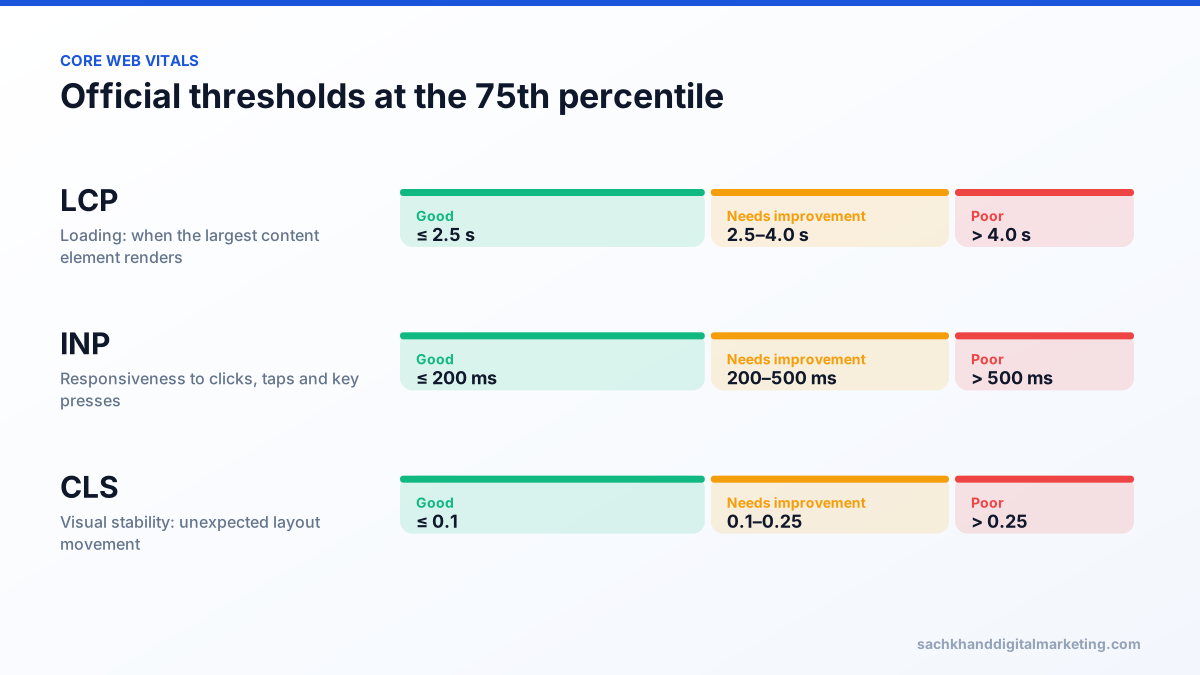
| Metric | What it measures | Good | Needs improvement | Poor |
|---|---|---|---|---|
| LCP (Largest Contentful Paint) | When the largest image or text block in the viewport renders | ≤ 2.5 s | 2.5–4.0 s | > 4.0 s |
| INP (Interaction to Next Paint) | How quickly the page visually responds to clicks, taps and key presses across the visit | ≤ 200 ms | 200–500 ms | > 500 ms |
| CLS (Cumulative Layout Shift) | How much visible content moves unexpectedly | ≤ 0.1 | 0.1–0.25 | > 0.25 |
Are Core Web Vitals a ranking factor in 2026?
Yes, but a modest one. Core Web Vitals became part of Google’s page experience signals in 2021, and Google’s documentation says its core ranking systems look to reward content that provides a good page experience. Google is equally clear that great page experience does not override relevance: a page that best answers the query will usually outrank a faster page that answers it poorly.
In practice, Core Web Vitals act as a tiebreaker between similarly relevant pages and can hold back pages in competitive results. The stronger case is commercial. Slow loading, jumping layouts and buttons that do not respond cost enquiries and sales regardless of rankings, and improving them usually lifts conversion rates.
How Core Web Vitals have changed
- 2020: Google introduced Core Web Vitals with LCP, First Input Delay (FID) and CLS.
- 2021–2022: the page experience update rolled out, first on mobile and then desktop.
- March 12, 2024: INP officially replaced FID as the responsiveness metric.
- Today: the three metrics are LCP, INP and CLS. Google announces changes well in advance on web.dev and the Chrome developers blog.
Field data vs lab data
This distinction causes more confusion than any other. Field data comes from real Chrome users and is collected in the Chrome User Experience Report (CrUX) over a rolling 28-day window. It is what Google uses. Lab data comes from simulated tests such as Lighthouse on a single device and connection. It is excellent for debugging but can differ significantly from what users experience. A page can score 95 in Lighthouse and still fail Core Web Vitals in the field, especially on mid-range Android phones.
INP cannot be measured in a standard lab test because it depends on real user interactions. Lighthouse reports Total Blocking Time (TBT) as a lab proxy; high TBT usually signals INP problems.
How to diagnose and fix LCP
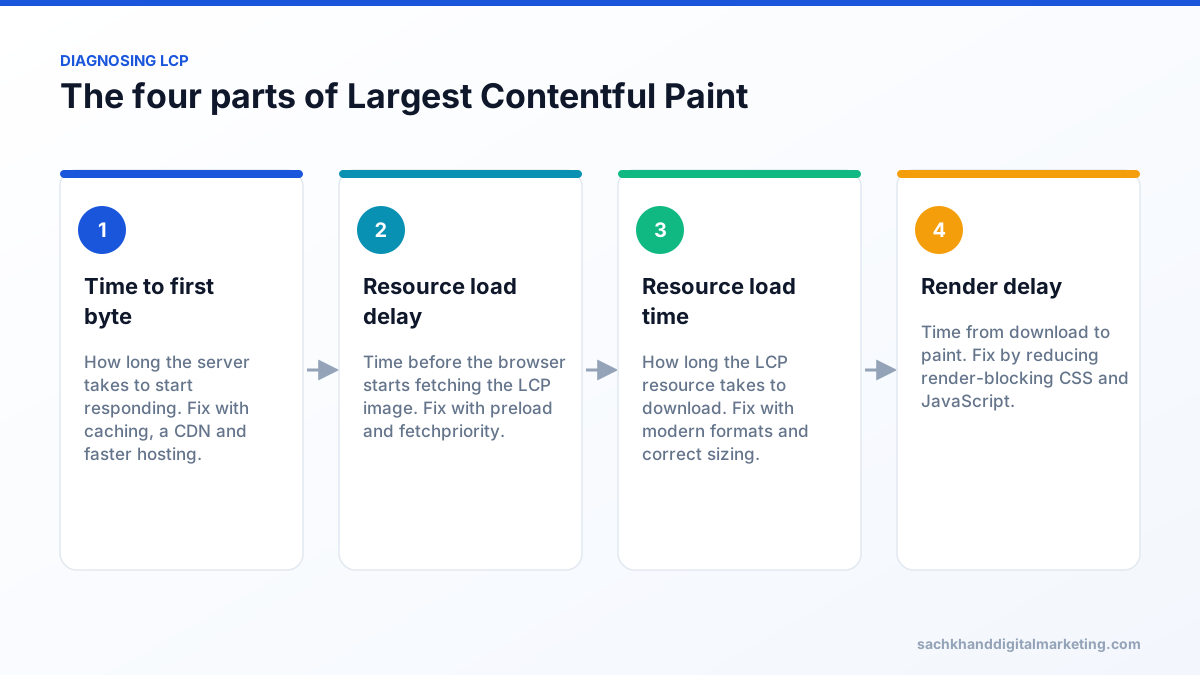
Start by identifying the LCP element in PageSpeed Insights. On most pages it is the hero image, a large heading or a background image. Then break the time down into its four parts.
Common LCP fixes
- Serve the LCP image efficiently: modern formats (WebP or AVIF), responsive
srcsetand dimensions matched to how it is displayed. - Never lazy-load the LCP image. Add
fetchpriority="high", and preload it if the browser discovers it late, for example as a CSS background. - Reduce server response time: full-page caching, a CDN, database optimisation and adequate hosting.
- Remove render-blocking resources: inline critical CSS, defer non-critical CSS and JavaScript.
- Avoid client-side rendering of above-the-fold content, which delays LCP until JavaScript runs.
- Self-host or preconnect to critical third-party origins such as font and image CDNs.
Get a prioritised action plan from our specialists, free.
How to diagnose and fix INP
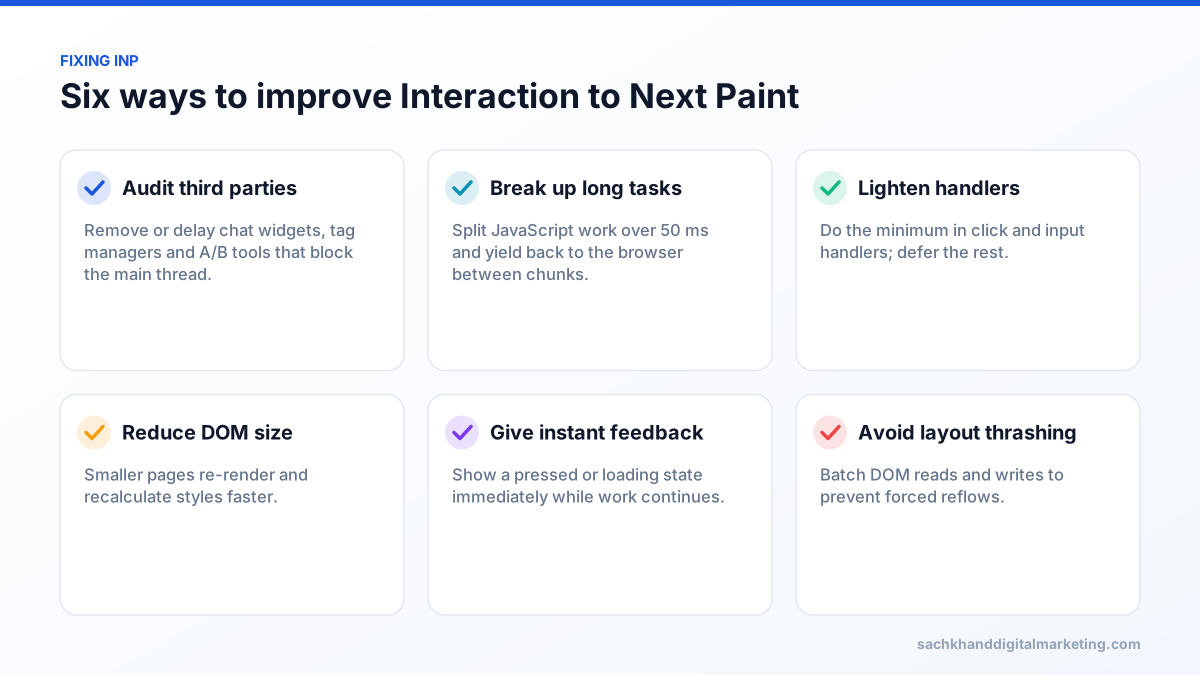
INP looks at the latency of interactions throughout a visit and reports close to the worst one. Each interaction has three phases: input delay (waiting for the main thread to be free), processing time (running event handlers) and presentation delay (rendering the next frame). Anything that keeps the main thread busy for long stretches hurts INP.
Finding the slow interactions
- Use the Chrome DevTools Performance panel, interact with the page and look for long tasks (over 50 milliseconds) around each interaction.
- Add the open-source
web-vitalsJavaScript library with attribution to report which elements and scripts cause slow interactions for real users. - Check menus, accordions, filters, add-to-cart buttons and form fields, which are the usual offenders.
Yielding to the main thread
Long JavaScript tasks block the browser from responding. Breaking work into smaller chunks and yielding between them lets the browser paint a response in time. Modern Chromium browsers support scheduler.yield(); a setTimeout-based fallback works elsewhere.
How to diagnose and fix CLS
CLS measures unexpected movement of visible content. It groups layout shifts into session windows and reports the largest window, so a single large jump can fail a page.
- Always set width and height (or CSS aspect-ratio) on images, videos and iframes.
- Reserve space for ads, embeds, cookie banners and dynamically injected content.
- Do not insert content above existing content unless it responds to a user interaction.
- Manage web fonts: preload key fonts and use fallback fonts with matched metrics to reduce text reflow.
- Animate with transform and opacity, not properties like top, height or margin that trigger layout.
- Support the back/forward cache so returning visitors see an instant, stable page.
WordPress Core Web Vitals optimisation
WordPress sites fail Core Web Vitals for predictable reasons: heavy themes and page builders, too many plugins, unoptimised images and budget hosting. A practical order of work:
- Move to quality hosting with server-level caching, a recent PHP version and a CDN.
- Audit plugins: remove unused ones and check which load scripts and styles on every page.
- Use a lightweight theme, or limit page-builder usage on key templates.
- Convert images to WebP or AVIF, serve responsive sizes and exclude the hero image from lazy loading.
- Delay non-essential JavaScript such as chat widgets, social embeds and marketing pixels until user interaction.
- Host fonts locally and limit font families and weights.
- Re-test with field data, and test forms, checkout and menus after enabling optimisation plugins.
Tools for measuring Core Web Vitals
| Tool | Data type | Best for |
|---|---|---|
| Google Search Console | Field | Site-wide status grouped by similar URLs |
| PageSpeed Insights | Field and lab | Checking a URL and getting diagnostics |
| CrUX Dashboard, API and BigQuery | Field | Historical trends and competitor comparisons |
| web-vitals JavaScript library | Field (your own) | Attribution for slow interactions and pages |
| Chrome DevTools Performance panel | Lab | Finding long tasks and layout shifts |
| Lighthouse | Lab | Repeatable pre-release testing |
A 30-day Core Web Vitals plan
- Week 1: pull field data from Search Console and PageSpeed Insights, and list failing templates (home, category, product, article, landing page) with traffic and revenue.
- Week 2: fix LCP and CLS on the highest-value template first: images, fonts, reserved space and caching.
- Week 3: tackle INP with a third-party script audit and long-task clean-up.
- Week 4: deploy, click “Validate fix” in Search Console and monitor field data as the 28-day window updates.
Set a performance budget, for example a maximum JavaScript size and LCP target per template, and check it in your deployment pipeline. It is far cheaper to prevent regressions than to fix them after rankings or conversions drop.
Frequently asked questions
What is INP in Core Web Vitals?
INP (Interaction to Next Paint) measures how quickly a page visually responds to user interactions across an entire visit. It replaced First Input Delay in March 2024. A good INP is 200 milliseconds or less; heavy JavaScript and third-party scripts are the most common causes of poor scores.
Do Core Web Vitals affect Google rankings?
Yes, as part of page experience signals, but relevance and content quality matter far more. Core Web Vitals mainly act as a tiebreaker, while having a strong direct effect on conversions.
What are good Core Web Vitals scores?
LCP of 2.5 seconds or less, INP of 200 milliseconds or less and CLS of 0.1 or less, measured at the 75th percentile of real page loads.
Why is my Lighthouse score good but Core Web Vitals failing?
Lighthouse is a lab test on one simulated device, while Core Web Vitals use field data from real users on many devices and networks. Slower phones, real interactions and third-party scripts often produce worse field results.
How long does it take for Core Web Vitals improvements to show?
Field data uses a rolling 28-day window, so improvements usually take around four weeks to be fully reflected in PageSpeed Insights and Search Console.
Want your Core Web Vitals audited and fixed?
Talk to our team about your goals. We will show you where the biggest wins are, starting with a free, no-obligation audit.