Website structure, or site architecture, is the way a website’s pages are organised, grouped into sections and connected by internal links. A good SEO site structure helps search engines discover and understand every important page, spreads link authority efficiently, and lets visitors reach what they need in as few clicks as possible.
On this page
- Why site structure matters for SEO
- Flat vs deep architecture
- A typical SEO-friendly structure
- How to build a good website structure
- Types of website structure
- URL structure examples
- How to audit your site structure
- Internal linking best practices
- Site structure during redesigns and migrations
- Breadcrumbs and structured data
- Signs your site structure needs work
- Quick reference
- Frequently asked questions
Why site structure matters for SEO
- Crawling — search engines find pages by following links. Pages buried deep or not linked at all (orphan pages) may never be crawled or indexed.
- Authority flow — internal links pass ranking value from strong pages, such as the homepage, to the pages you want to rank.
- Topical relevance — grouping related pages together shows search engines you cover a subject in depth.
- User experience — clear navigation reduces bounces and helps visitors convert.
- Sitelinks — a logical structure makes it easier for Google to show sitelinks under your brand result.
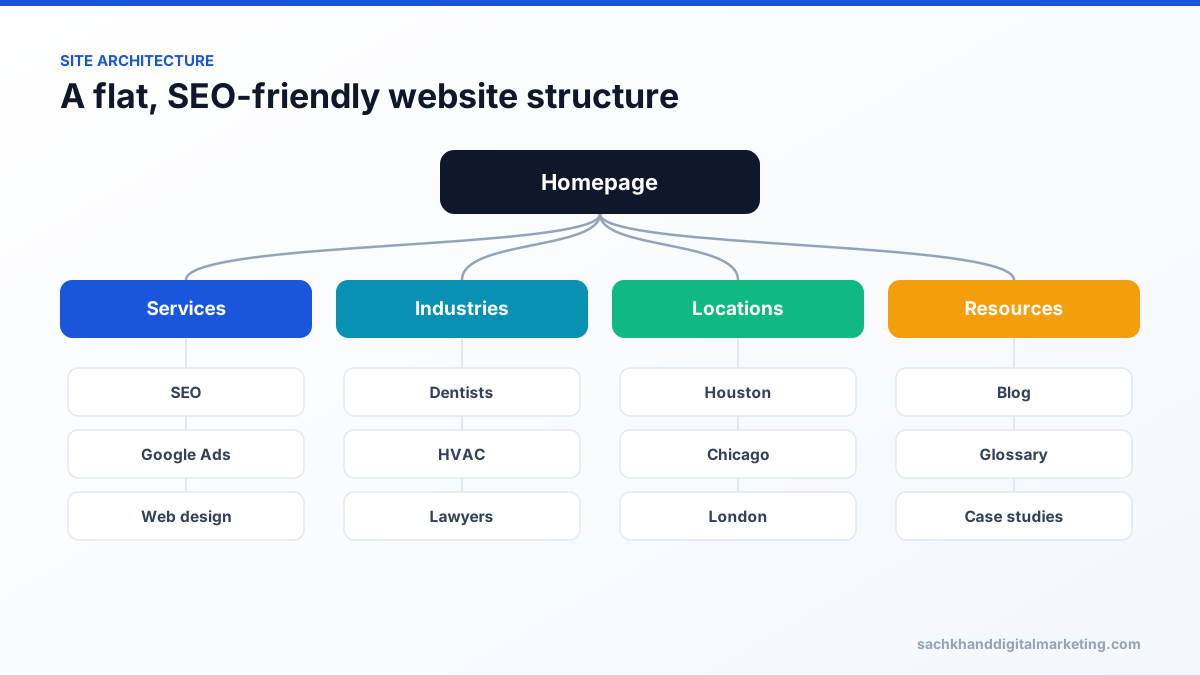
Flat vs deep architecture
In a flat structure, every important page is reachable within about three clicks of the homepage. In a deep structure, pages sit five, six or more clicks down. Flat structures are generally better for SEO because crawlers and link authority reach important pages more easily. “Flat” does not mean linking every page from the homepage — it means a sensible hierarchy with short paths.
A typical SEO-friendly structure
Homepage → main categories or services → subcategories → individual pages. For example: Home → SEO Services → Local SEO → Local SEO for Dentists. Content hubs work the same way: a pillar page on a broad topic links to detailed cluster pages, and each cluster page links back to the pillar.
How to build a good website structure
- Plan categories around how customers search, using keyword research.
- Keep URLs short and consistent with the hierarchy, e.g.
/services/local-seo/. - Use breadcrumbs, with BreadcrumbList structured data.
- Link contextually between related pages, using descriptive anchor text.
- Maintain an up-to-date XML sitemap and submit it in Google Search Console.
- Control faceted navigation and filter URLs so they do not create thousands of near-duplicate pages.
- Audit regularly for orphan pages, redirect chains and broken internal links.
Types of website structure
| Structure | How it works | Best for |
|---|---|---|
| Hierarchical | Homepage → categories → subcategories → pages | Most business and ecommerce sites |
| Hub and spoke (topic clusters) | Pillar page linking to detailed related articles | Content marketing and blogs |
| Silo | Strictly separated sections with limited cross-linking | Very large sites with distinct topics (use with care) |
| Sequential | Pages visited in a set order | Onboarding, courses, checkouts |
URL structure examples
| Good | Avoid |
|---|---|
| /services/local-seo/ | /page.php?id=4471 |
| /women/running-shoes/ | /category/cat123/sub456/items/ |
| /blog/what-is-a-meta-description/ | /2026/09/17/post-draft-final-v2/ |
Keep URLs short, lowercase, hyphen-separated and descriptive, and avoid changing them without 301 redirects.
How to audit your site structure
- Crawl the site and export click depth for every indexable URL.
- Flag important pages deeper than three clicks.
- List orphan pages that appear in sitemaps or analytics but receive no internal links.
- Review internal link counts; money pages should receive links from relevant pages.
- Check navigation labels match how customers search.
- Look for duplicate or overlapping pages that compete with each other.
- Confirm breadcrumbs and BreadcrumbList structured data reflect the hierarchy.
Internal linking best practices
- Link from high-authority pages, such as the homepage and popular guides, to priority pages.
- Use descriptive anchor text that tells users and search engines what the destination is about.
- Link related pages in context within body content.
- Avoid linking the same page many times from one page.
- Use standard HTML links that crawlers can follow.
Site structure during redesigns and migrations
Changing navigation, categories or URLs can reshape how authority flows through a site. Before launch, map every old URL to its new equivalent with 301 redirects, keep important pages at similar or shallower depth, update internal links and sitemaps, and monitor Search Console closely for indexing changes.
Breadcrumbs and structured data
Breadcrumbs show visitors where they are, such as Home › Services › Local SEO, and give search engines a clear hierarchy. Adding BreadcrumbList structured data helps Google understand that hierarchy and can display a cleaner path in search results instead of a raw URL.
Signs your site structure needs work
- Important pages receive few impressions despite good content.
- Search Console shows many “Discovered – currently not indexed” URLs.
- Visitors use site search to find pages that should be in navigation.
- Multiple pages compete for the same keywords.
- New content takes a long time to be indexed.
- Your navigation labels use internal jargon rather than customer language.
Quick reference
| Principle | Target |
|---|---|
| Click depth for key pages | About three clicks or fewer |
| Orphan pages | None for indexable content |
| URL style | Short, descriptive, lowercase, hyphenated |
| Navigation | Matches how customers search |
| Internal links | Contextual links between related pages |
Frequently asked questions
What is website architecture in SEO?
It is the way pages are organised and interlinked. Good architecture makes every important page easy for search engines to crawl and for users to reach.
How many clicks deep should a page be?
Important pages should usually be reachable within three clicks of the homepage.
What is an orphan page?
A page with no internal links pointing to it. Search engines struggle to find orphan pages, and they receive no internal link authority.
What is the best website structure for SEO?
For most sites, a logical hierarchy with important pages within about three clicks of the homepage, supported by topic clusters, breadcrumbs and strong contextual internal links.
Want experts to handle this for you?
Our specialists turn these fundamentals into rankings, leads and revenue. Start with a free, no-obligation audit of your site.