An H1 tag is the HTML element for the main heading on a web page — the top level in the heading hierarchy that runs from H1 to H6. It tells visitors, screen readers and search engines what the page is about, and it is usually the largest visible headline on the page.
On this page
- What an H1 looks like
- Why the H1 matters for SEO
- H1 vs title tag
- Can a page have more than one H1?
- H1 best practices
- H1 in HTML: a simple example
- Title tag vs H1 vs meta description
- How to check your H1 tags
- Common H1 problems in themes and CMSs
- Examples of good H1s
- H1 tags and accessibility
- How to write a strong H1
- Quick reference
- Frequently asked questions
What an H1 looks like
In HTML: <h1>Emergency Plumbing Services in Houston</h1>. Subsections then use <h2>, and their subsections <h3>, creating an outline of the page.
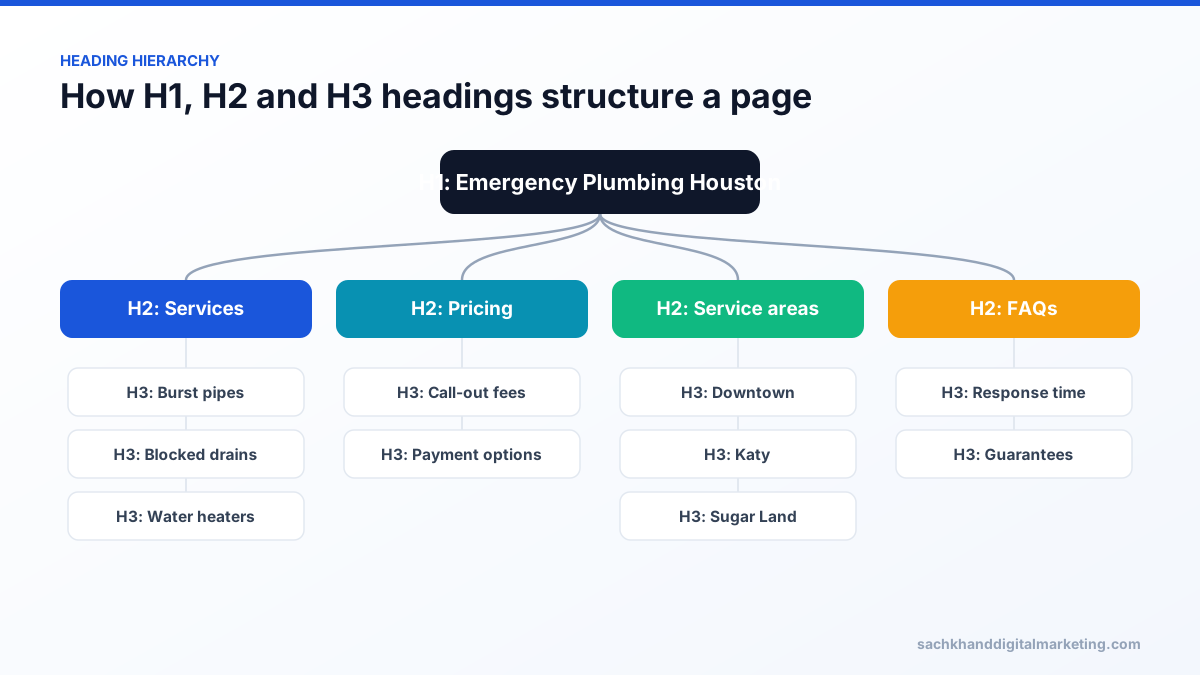
Why the H1 matters for SEO
- Relevance — headings help search engines understand the main topic and structure of the content.
- User experience — visitors decide within seconds whether they are on the right page; the H1 confirms it.
- Accessibility — screen-reader users navigate by headings, starting with the H1.
- Title fallback — when Google rewrites a title tag, it often uses the H1 instead.
H1 vs title tag
The title tag appears in search results and the browser tab. The H1 appears on the page itself. Both should describe the same topic and ideally include the primary keyword, but the H1 can be longer and more natural, while the title is written to fit the results page and win the click.
Can a page have more than one H1?
HTML allows it, and Google has said multiple H1s do not cause a penalty. Still, one clear H1 per page is the best practice: it gives a single unambiguous topic, a cleaner outline for accessibility tools, and is easier to maintain. A common problem is a theme that wraps the logo or a sidebar widget in an H1, so check your templates.
H1 best practices
- Use exactly one descriptive H1 near the top of the main content.
- Include the primary keyword or a close variation naturally.
- Keep it concise — typically under 70 characters.
- Do not skip heading levels to change font size; style with CSS instead.
- Make sure the H1 is visible text, not an image without alt text.
H1 in HTML: a simple example
<h1>Emergency Plumbing Services in Houston</h1><h2>What we fix</h2><h3>Burst pipes</h3>
Headings should describe the content that follows. Use CSS to control size and style, rather than choosing a heading level because of how it looks.
Title tag vs H1 vs meta description
| Element | Where it appears | Main purpose |
|---|---|---|
| Title tag | Search results and browser tab | Relevance signal and click-worthy headline |
| H1 | On the page | Main visible heading confirming the topic |
| Meta description | Often in search results snippet | Summary that encourages clicks |
How to check your H1 tags
- Browser: right-click the headline, choose Inspect and check it is an
h1element. - Crawlers: tools such as Screaming Frog report missing, duplicate and multiple H1s across a site.
- Accessibility extensions: heading outline tools show whether heading levels are logical.
Common H1 problems in themes and CMSs
- The logo or site name wrapped in an H1 on every page.
- Page builders using H1 styling for several decorative headings.
- Blog templates where the post title is an H2 and a sidebar widget is the H1.
- Hero sliders with several H1s, one per slide.
- Headlines rendered as images with no text alternative.
Examples of good H1s
- Service page: “Commercial Roof Repair in Denver”.
- Product page: “Oak Extendable Dining Table”.
- Blog post: “How to Choose an HVAC SEO Company”.
- Glossary entry: “What Is an H1 Tag?”.
H1 tags and accessibility
Screen reader users often navigate pages by jumping between headings. A single, descriptive H1 tells them immediately what the page is about, and a logical order of H2 and H3 headings lets them skim sections the same way sighted users scan visually. Skipping levels, using headings purely for styling or leaving the H1 empty makes pages harder to use and can fail accessibility audits under standards such as WCAG.
How to write a strong H1
- Start from the page’s primary keyword and search intent.
- Describe the page content accurately and specifically.
- Add a helpful qualifier where useful, such as a location, audience or year.
- Keep it readable; write for people first.
- Check it differs meaningfully from other pages’ H1s on your site.
Quick reference
| Question | Answer |
|---|---|
| How many H1s per page? | One is best practice |
| Should it include the keyword? | Yes, naturally |
| Can it match the title tag? | Yes, but it does not have to |
| Ideal length | Usually under about 70 characters |
| Can an image be the H1? | Avoid it; use real text |
Frequently asked questions
What is an H1 in SEO?
The H1 is the main heading of a page. In SEO it signals the page’s primary topic to search engines and confirms relevance to visitors.
Should the H1 be the same as the title tag?
It does not have to be. Both should target the same topic, but the title is written for search results and the H1 for readers on the page.
Is a missing H1 bad for SEO?
It will not stop a page ranking, but it removes a clear relevance and accessibility signal. Every important page should have one.
Should every page have an H1?
Yes. Every important page should have one clear H1 that describes its main topic, helping visitors, screen readers and search engines understand the page.
Want experts to handle this for you?
Our specialists turn these fundamentals into rankings, leads and revenue. Start with a free, no-obligation audit of your site.