A primary keyword is the main search term a web page is built to rank for. It reflects the page’s core topic and search intent, and it guides the title tag, H1, URL and content. Each important page should have one distinct primary keyword so pages on the same site do not compete with each other.
On this page
- Primary vs secondary keywords
- How to choose a primary keyword
- Where to place the primary keyword
- Keyword cannibalisation
- How to find your primary keyword: an example
- A simple keyword mapping template
- Primary keyword myths
- Checking whether your page targets its primary keyword
- Primary keywords for different page types
- What to do when two pages target the same primary keyword
- Frequently asked questions
Primary vs secondary keywords
The primary keyword is the page’s headline target — for example “running shoes for women”. Secondary keywords are closely related variations and subtopics the same page can also rank for, such as “women’s trail running shoes” or “best cushioned running shoes”. They support the primary keyword rather than competing with it.
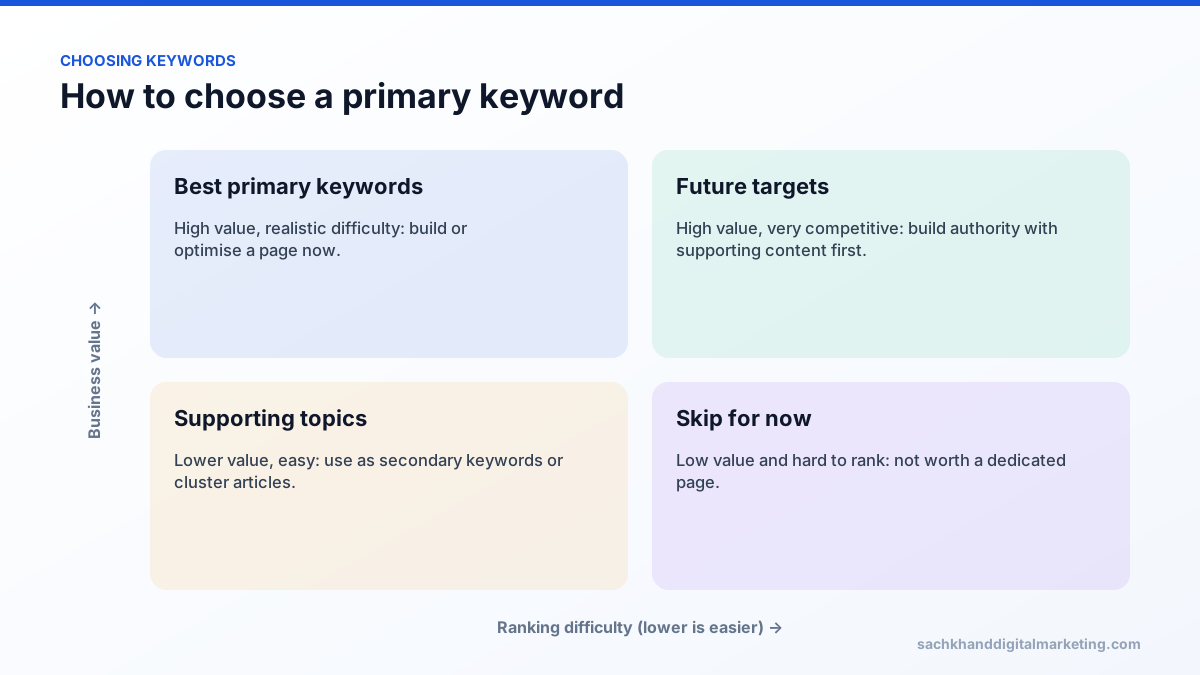
How to choose a primary keyword
- Match search intent. Look at what already ranks. If the results are product pages, a blog post will struggle, and vice versa.
- Check volume. There must be enough real searches to justify the page.
- Be realistic about difficulty. Newer sites win faster with more specific terms than with broad short-tail keywords.
- Prioritise business value. A lower-volume term that signals buying intent often beats a popular informational one.
- Avoid duplicates. If another page on your site already targets it, improve that page instead.
Where to place the primary keyword
- The title tag, ideally near the start.
- The H1 heading.
- The URL slug, kept short.
- The first paragraph, naturally.
- The meta description, to reinforce relevance to the searcher.
- Image alt text and internal link anchor text where it genuinely fits.
Modern search engines understand synonyms and context, so there is no ideal keyword density. Write for the reader, cover the topic completely, and the primary keyword and its variations will appear naturally.
Keyword cannibalisation
When two or more of your pages target the same primary keyword, Google has to guess which one to rank, and often ranks neither well. Mapping one primary keyword to each URL before writing is the simplest way to prevent it.
How to find your primary keyword: an example
Imagine a page for a service that repairs commercial refrigeration in Chicago.
- Brainstorm seed terms: commercial refrigeration repair, restaurant fridge repair, walk-in cooler repair.
- Check demand in a keyword tool and Search Console.
- Look at the results: “commercial refrigeration repair Chicago” shows local service pages and a map pack, which matches the page type.
- Assess difficulty: competitors are local companies with modest authority, so ranking is realistic.
- Choose: primary keyword “commercial refrigeration repair Chicago”; secondary keywords “walk-in cooler repair”, “restaurant refrigerator repair” and “emergency refrigeration service”.
A simple keyword mapping template
| URL | Primary keyword | Intent | Secondary keywords |
|---|---|---|---|
| /services/ac-repair/ | ac repair houston | Local commercial | air conditioner repair, emergency ac repair |
| /services/ac-installation/ | ac installation houston | Local commercial | new air conditioner, ac replacement cost |
| /blog/ac-not-cooling/ | ac not cooling | Informational | ac blowing warm air, why is my ac not cold |
Keeping a map like this prevents two pages targeting the same keyword and shows where new pages are needed.
Primary keyword myths
- “Use the keyword a set number of times.” There is no ideal keyword density.
- “LSI keywords are a Google ranking factor.” Google does not use “LSI keywords”; cover the topic naturally with related terms instead.
- “Exact-match wording is required.” Search engines understand close variants and synonyms.
- “The highest-volume keyword is always best.” Intent and conversion potential matter more.
Checking whether your page targets its primary keyword
- Keyword or close variant in the title tag and H1.
- Topic made clear in the first paragraph.
- Descriptive URL.
- Related subtopics covered in subheadings.
- Internal links pointing to the page with relevant anchor text.
- No other page on the site targeting the same keyword.
Primary keywords for different page types
| Page type | Typical primary keyword |
|---|---|
| Homepage | Brand plus core category, such as “digital marketing agency” |
| Service page | Service plus location or audience, such as “SEO for dentists” |
| Category page | Product category, such as “women’s running shoes” |
| Product page | Brand and model name |
| Blog post | A specific question or topic, such as “how to choose a CRM” |
| Glossary entry | “What is [term]” |
What to do when two pages target the same primary keyword
- In Search Console, check which URLs receive impressions for the keyword.
- Decide which page best matches the intent.
- Merge the useful content from the weaker page into the stronger one.
- Redirect the weaker page with a 301, or retarget it to a different, distinct keyword.
- Update internal links so they point to the chosen page.
Frequently asked questions
How many primary keywords should a page have?
One. A page can rank for hundreds of related queries, but it should be built around a single primary keyword and intent.
What is the difference between a primary keyword and a focus keyword?
They mean the same thing. “Focus keyword” is the term used by SEO plugins such as Yoast.
Should the primary keyword be in the URL?
It helps users and search engines understand the page, but keep URLs short and do not change existing URLs just to add a keyword.
What is the difference between a primary and secondary keyword?
The primary keyword is the main search a page is built to rank for. Secondary keywords are closely related terms and subtopics the same page can also rank for without needing separate pages.
Want experts to handle this for you?
Our specialists turn these fundamentals into rankings, leads and revenue. Start with a free, no-obligation audit of your site.