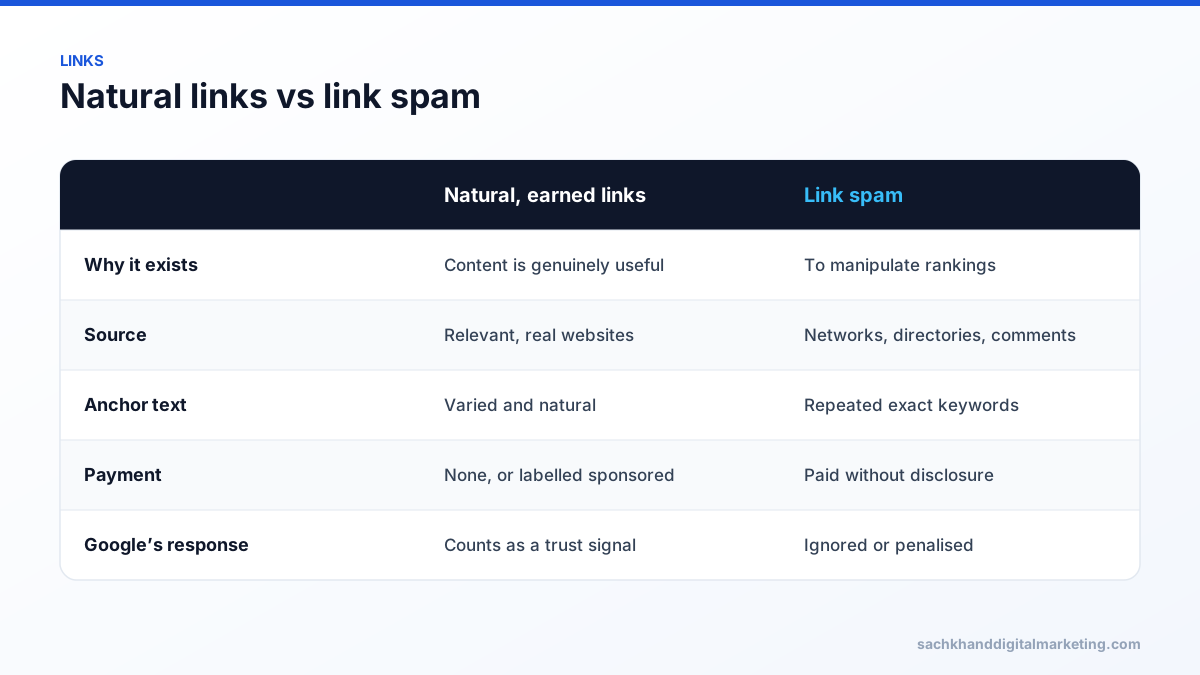
Link spam is any link created mainly to manipulate a site’s search rankings rather than to help readers — for example buying links that pass ranking credit, large-scale link exchanges, private blog networks and automated comment or directory links. Google’s spam policies prohibit it, and its systems either ignore these links or penalise the sites involved.
On this page
- Common types of spam links
- How Google handles link spam
- How to label links correctly
- What to do about spam links pointing to your site
- What to do instead
- Examples: acceptable vs spammy links
- How to audit your backlinks
- What a disavow file looks like
- Recovering from a link-related manual action
- Frequently asked questions
Common types of spam links
- Paid links that pass ranking credit without a
rel="sponsored"orrel="nofollow"attribute. - Excessive link exchanges (“link to me and I’ll link to you”) arranged for rankings.
- Private blog networks (PBNs) — networks of sites built only to link to money sites.
- Automated links generated by software on forums, comments or profiles.
- Keyword-rich anchor links in articles or press releases distributed across many sites.
- Low-quality directory and bookmark links created in bulk.
- Hidden or widget links embedded in themes, widgets or footers across many sites.
How Google handles link spam
Google uses an AI-based system called SpamBrain to detect both sites that buy links and sites that sell them. Since its link spam updates, the main effect is neutralisation: spam links simply stop counting, so any rankings built on them fall away. In more serious or deliberate cases, a human reviewer can issue a manual action (“Unnatural links to your site”), which appears in Google Search Console and can remove pages or the whole site from results until fixed.
How to label links correctly
rel="sponsored"— paid placements, affiliate links and sponsorships.rel="ugc"— user-generated content such as comments and forum posts.rel="nofollow"— any other link you do not want to vouch for.
What to do about spam links pointing to your site
Most sites attract some low-quality links without doing anything wrong, and Google ignores them. You generally do not need to act unless:
- you have a manual action for unnatural links, or
- you (or a previous agency) knowingly built or bought manipulative links at scale.
In those cases, remove what you can by contacting site owners, then use Google’s Disavow Links tool for the rest and, if there is a manual action, submit a reconsideration request. Disavowing links unnecessarily can remove legitimate value, so use it carefully.
What to do instead
Earn links that would exist even if search engines did not: original research, useful tools, expert commentary for journalists, genuine partnerships and digital PR.
Examples: acceptable vs spammy links
| Acceptable | Spammy |
|---|---|
| A local newspaper cites your business in a story | Buying a “guest post” on a site that publishes anything for payment |
| An industry association lists members with links | Submitting to hundreds of low-quality directories |
| A partner links to your integration page | Swapping links with dozens of unrelated sites |
| Sponsored content marked with rel="sponsored" | Paid links with keyword-rich anchor text and no disclosure |
| A blogger reviews your product honestly | Links from a private blog network you control |
How to audit your backlinks
- Export linking domains from Google Search Console’s Links report and a backlink tool.
- Sort by domain and review patterns: irrelevant foreign sites, spun content, exact-match anchors, sitewide footer links.
- Identify any links you, a previous agency or a vendor built or paid for.
- Check Search Console for manual actions.
- Decide on action: usually no action for random low-quality links; removal or disavow for manipulative links you built.
What a disavow file looks like
The disavow file is a plain text file uploaded through Google’s Disavow Links tool, with one entry per line:
# Paid links from 2023 campaigndomain:spammy-directory.examplehttps://blog.example.net/post-with-paid-link/
Use it sparingly. Google says most sites do not need it, and disavowing good links removes their value.
Recovering from a link-related manual action
- Document every manipulative link you can find.
- Ask site owners to remove links and record your outreach.
- Disavow links you cannot remove.
- Stop any ongoing link schemes.
- Submit a reconsideration request explaining what happened and what you fixed.
Frequently asked questions
What is a spam link?
A spam link is a backlink created mainly to manipulate search rankings, such as a paid link without a sponsored attribute, a PBN link or an automated comment link.
Can spam links hurt my website?
Usually Google just ignores them. They can hurt if you built them deliberately at scale, which can lead to a manual action or rankings loss when the links are neutralised.
Should I disavow spam backlinks?
Only if you have a manual action or know manipulative links were built to your site. For random low-quality links, Google recommends doing nothing.
What does Google consider a link scheme?
Google considers any links intended to manipulate rankings a link scheme, including buying or selling links that pass ranking credit, excessive link exchanges, automated link building and large-scale article or guest post campaigns with keyword-rich anchor links.
Want experts to handle this for you?
Our specialists turn these fundamentals into rankings, leads and revenue. Start with a free, no-obligation audit of your site.