Google ranks local results on relevance, distance and prominence. You cannot move your address, so Google Business Profile optimisation focuses on the other two: the most specific primary category, complete services and attributes, accurate hours, real photos, a steady flow of genuine reviews with replies, consistent details across the web and a website page that matches the profile. Avoid keyword-stuffed names and fake addresses, which are the most common causes of suspension.
On this page
- What is Google Business Profile?
- How Google local search ranking works
- The Google Business Profile optimization checklist
- Protecting your profile from unwanted edits
- Suspensions: why they happen and what to do
- Google Business Profile best practices for 2026
- Recent Google Business Profile changes worth knowing
- Multi-location businesses
- How to measure Google Business Profile performance
- Common mistakes that hurt local rankings
- Frequently asked questions
For businesses that serve customers locally, the Google Business Profile is often more valuable than the website homepage. It controls whether you appear in the Google Maps local pack, what searchers see before they ever visit your site, and how easily they can call, get directions or book. This checklist covers everything we optimise for clients, including the policies that get profiles suspended and how to measure results.
What is Google Business Profile?
Google Business Profile (formerly Google My Business) is the free listing that shows your business on Google Search and Google Maps. It includes your name, category, location or service area, hours, phone number, website, photos, reviews, products, services and posts. For local searches, Google builds the map pack from these profiles rather than from websites.
How Google local search ranking works
Google’s guidance says local results are based mainly on three factors:
- Relevance: how well your profile matches the search. Categories, services, description, website content and review text all contribute.
- Distance: how far your business is from the searcher or the location in the query.
- Prominence: how well known your business is, based on reviews, links, articles, directory listings and organic search presence.
Google local search optimisation is therefore about maximising relevance and prominence. Our local SEO playbook covers the website and link side; this guide focuses on the profile itself.
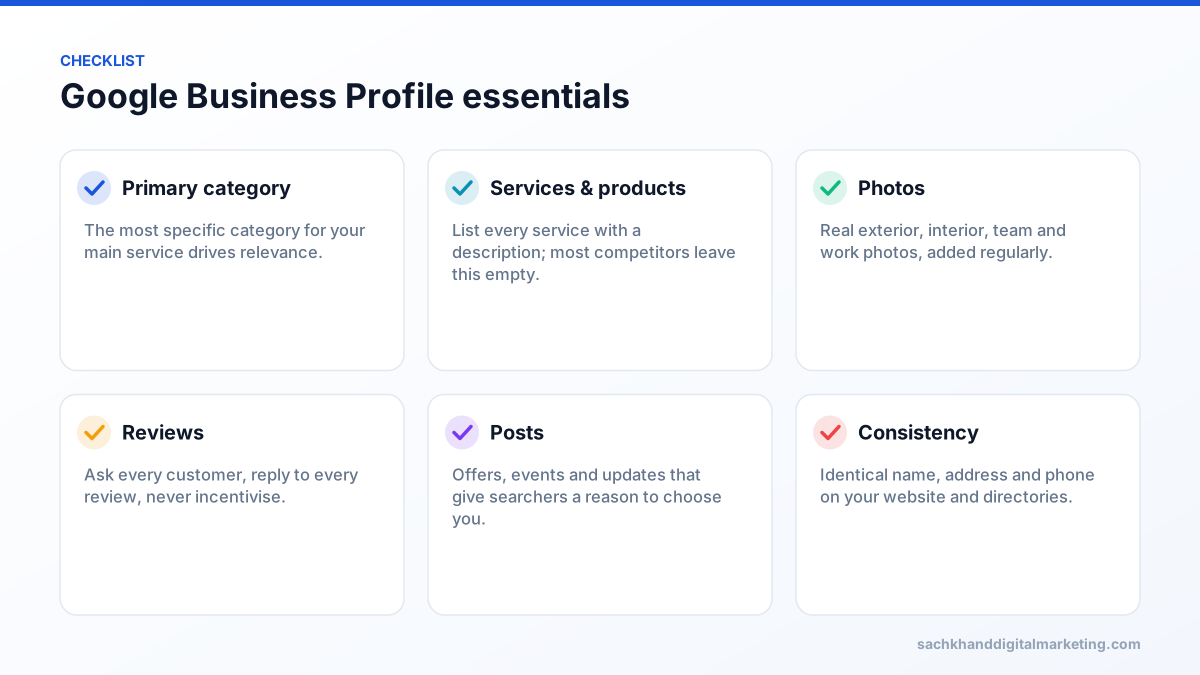
The Google Business Profile optimization checklist
1. Claim and verify your profile
Search for your business on Google or Maps, claim the listing and complete verification. Google chooses the verification method, and video verification is now common: you record a short continuous video showing your location, signage or tools of the trade and proof of management. Businesses with ten or more locations of the same brand can request bulk verification. Make sure the business owner holds primary ownership and add staff or agencies as managers, so access is never lost when people leave.
2. Use your real business name
Enter your name exactly as it appears on signage, stationery and your website. Adding keywords, locations or taglines (“Acme Plumbing – Best Emergency Plumber Houston”) violates Google’s guidelines, invites edits from competitors and is one of the most common reasons profiles are suspended.
3. Choose the most specific primary category
The primary category is one of the strongest relevance signals. Pick the one that describes your main service as precisely as possible, for example “Emergency locksmith service” rather than “Locksmith” if emergencies are your core work, or “Cosmetic dentist” rather than “Dentist” if that is your focus. Add secondary categories only for services you genuinely provide. A useful exercise is to check the categories used by the businesses already ranking for your most valuable searches.
4. Set your address or service area correctly
- Storefront businesses that serve customers at their premises show their address.
- Service-area businesses such as plumbers, cleaners and mobile mechanics that visit customers should hide their address and list the towns, cities or postcodes they serve.
- Hybrid businesses can show an address and list service areas.
Never use virtual offices, co-working addresses you do not staff, or mailbox services. They violate the guidelines and are a frequent reason for suspension.
5. Complete hours, special hours and contact details
Add regular hours, holiday and special hours, a local phone number and your website. Tag the website link with UTM parameters, for example ?utm_source=google&utm_medium=organic&utm_campaign=gbp, so profile traffic is reported separately from other organic visits. If you take bookings online, add your appointment or booking link.
6. Add services and products
List every service with a clear description and, where appropriate, a price or price range. Retailers and product-based businesses should add products with photos and prices. These sections help Google match your profile to more specific searches, and they are one of the easiest ways to outperform competitors who leave them empty.
7. Write a helpful business description
You have up to 750 characters. Explain what you do, who you serve, where, and what makes you different, in natural language. Put the most important information in the first 250 characters. Do not include links, promotional offers, all-caps text or lists of keywords.
8. Choose relevant attributes
Attributes such as wheelchair accessibility, online appointments, free Wi-Fi, onsite services, women-owned or veteran-led help searchers decide and can appear on your profile. Choose every attribute that genuinely applies.
9. Upload real photos and videos regularly
- Logo and cover photo that look sharp on mobile.
- Exterior photos from the angles customers arrive from, so people can recognise your building.
- Interior photos of reception, treatment rooms, showrooms or workshop.
- Team photos and people at work.
- Before-and-after photos and completed projects.
- Short videos showing your service or premises.
Avoid stock images and heavily edited photos. Add new images every month so the profile looks active.
10. Build a steady flow of reviews and reply to every one
Review count, rating and recency influence both rankings and whether searchers choose you. Ask every customer, ideally right after the job with a direct review link sent by SMS or email. Reply to every review professionally, including negative ones. Never buy reviews, offer incentives or ask only customers you expect to be happy. These practices break Google’s policies, and fake reviews are also illegal in several countries, including under the US FTC rule on fake reviews.
If you receive a review that violates Google’s policies, such as spam, conflicts of interest or offensive content, report it from your profile and document the issue. Do not argue in public replies; respond briefly and professionally so future customers see a calm business.
11. Publish posts
Posts let you share offers, events, new services and seasonal updates directly on your profile. They are not a major ranking factor on their own, but they keep the profile active, give searchers reasons to act and can highlight services people may not know you offer. Aim for at least a few posts a month, each with a clear image and call to action.
12. Keep your details consistent across the web
Your name, address and phone number should match your website, social profiles, Apple Business Connect, Bing Places, Yelp, industry directories and data aggregators. Inconsistencies weaken Google’s confidence in your business information and can cause incorrect details to be suggested for your profile.
13. Match your website to your profile
Link the profile to the most relevant page. For a single-location business that is usually the homepage; for multi-location businesses it should be the dedicated location page. That page should display the same name, address, phone and hours, include LocalBusiness structured data, an embedded map and content about the services offered at that location.
Protecting your profile from unwanted edits
Anyone can suggest edits to a Business Profile, and Google sometimes applies changes from users or third-party data. Check your profile at least weekly, review any “updates from Google”, and correct wrong information promptly. Keeping your website and directory details accurate reduces the chance of incorrect edits.
Suspensions: why they happen and what to do
Profiles are usually suspended for guideline issues rather than at random. The most common causes are keyword-stuffed names, virtual or ineligible addresses, multiple profiles for the same location, and sudden changes to key details such as name, category and address at the same time.
- Read Google Business Profile guidelines and fix anything that does not comply.
- Gather evidence: business registration, utility bills, photos of signage and premises, and licences.
- Submit a reinstatement request through Google’s official form, not by creating a new profile.
- Avoid making further changes while the appeal is reviewed.
Google Business Profile best practices for 2026
- Treat the profile as a live channel: new photos, posts and review replies every month.
- Answer common questions in your services, description and website FAQs, so searchers and AI features find accurate information.
- Build genuine prominence: local press, sponsorships, partnerships and associations generate links and mentions that support rankings.
- Keep one profile per real location: duplicates can lead to suspension of all related profiles.
- Keep AI answers in mind: accurate, detailed profile information and reviews also feed AI-generated local recommendations.
Recent Google Business Profile changes worth knowing
- Free Business Profile websites were retired in 2024. Profiles that relied on a business.site address need a proper website link.
- Chat and call history features were retired in 2024, so phone, website and booking links are the main contact routes.
- Management moved into Google Search and Maps. Most edits are made directly from the profile shown when you search your business name while signed in.
Google changes features frequently, so check the official Google Business Profile Help Center before relying on any specific feature.
Multi-location businesses
- Create and verify one profile per genuine location, using consistent naming such as “Brand Name” without location keywords.
- Use bulk management tools for ten or more locations and keep a single source of truth for hours and contact details.
- Link each profile to its own location page with unique local content.
- Run reviews and photos per location so each branch builds its own prominence.
- Report performance by location to spot branches that need attention.
How to measure Google Business Profile performance
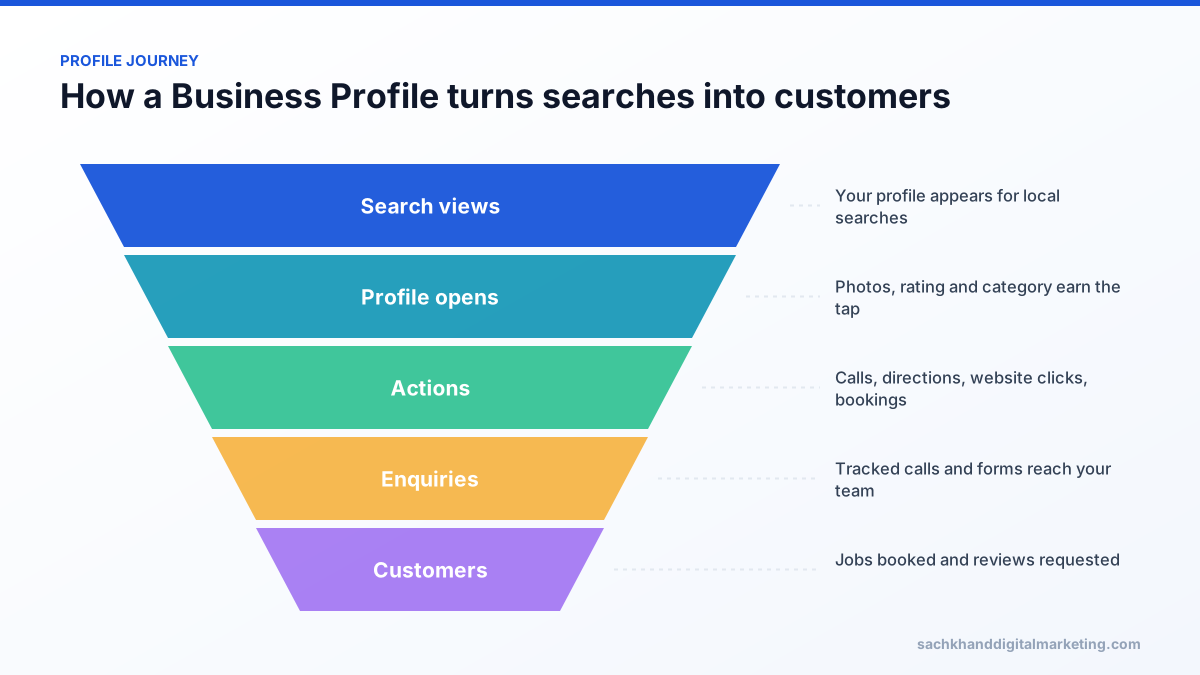
The Performance section of your profile shows how many people viewed it, the searches they used, and how many called, requested directions, clicked through to your website or booked. Combine this with UTM-tagged traffic in Google Analytics, call tracking and your CRM to see which actions became paying customers, and track map pack visibility across a grid of points in your service area rather than from a single address.
Common mistakes that hurt local rankings
- Keyword-stuffed business names.
- A broad or wrong primary category.
- Showing a home address as a storefront or using a virtual office.
- Letting reviews go months without new ones or replies.
- Different phone numbers or addresses across directories.
- Linking the profile to a generic page that never mentions the location or services.
Frequently asked questions
How do I optimize my Google Business Profile for local SEO?
Choose the most specific primary category, complete services, products, hours and attributes, add real photos regularly, earn a steady flow of reviews and reply to them, publish posts, keep your name, address and phone consistent across the web, and link to a matching page on your website.
Does Google Business Profile help SEO?
Yes. It is the main factor in whether you appear in the Google Maps local pack, and profile activity, reviews and consistent information also support your wider local search visibility.
How often should I update my Google Business Profile?
Check it at least weekly for suggested edits and new reviews, reply to reviews promptly, and add fresh photos or posts every month.
Why is my business not showing on Google Maps?
Common reasons are an unverified or suspended profile, a category that does not match the search, distance from the searcher, fewer reviews than competitors, or inconsistent business details across the web.
Can a service-area business rank without showing its address?
Yes. Service-area businesses should hide their address and list the areas they serve. Rankings still depend on relevance, prominence and distance from the verified business location.
Want to win the Google Maps local pack in your area?
Talk to our team about your goals. We will show you where the biggest wins are, starting with a free, no-obligation audit.