Local SEO wins customers who search for services near them. Google ranks local results on relevance, distance and prominence, so focus on what you can control: a complete and accurate Google Business Profile, a steady flow of genuine reviews, consistent business details across the web, location and service pages with real local substance, and local links and mentions. Measure calls, direction requests and booked jobs rather than rankings alone.

On this page
- What local SEO is, and why it matters
- How Google ranks local results
- Step 1: Optimise your Google Business Profile
- Step 2: Build a review engine
- Step 3: Get your citations and NAP consistent
- Step 4: Create location and service pages that deserve to rank
- Step 5: Earn local links and mentions
- Your first 90 days
- Measuring local SEO
- Multi-location businesses
- Common local SEO mistakes
- Frequently asked questions
When someone searches “emergency electrician” or “dentist near me”, Google shows a map with three businesses before most organic results. Those three positions, known as the local pack or map pack, capture a large share of calls, direction requests and website visits for local searches. This playbook explains how local rankings work and the exact steps we use to help service-area and storefront businesses win them. Use it as a local SEO guide for winning the Google map pack: the local pack ranking factors, and the exact steps to act on them.
What local SEO is, and why it matters
Local SEO is the process of increasing visibility for searches with local intent, whether the searcher types a location (“SEO agency Houston”), uses “near me”, or simply searches for a service Google knows is usually local. It covers your Google Business Profile, your website’s location and service pages, reviews, citations and local authority signals.
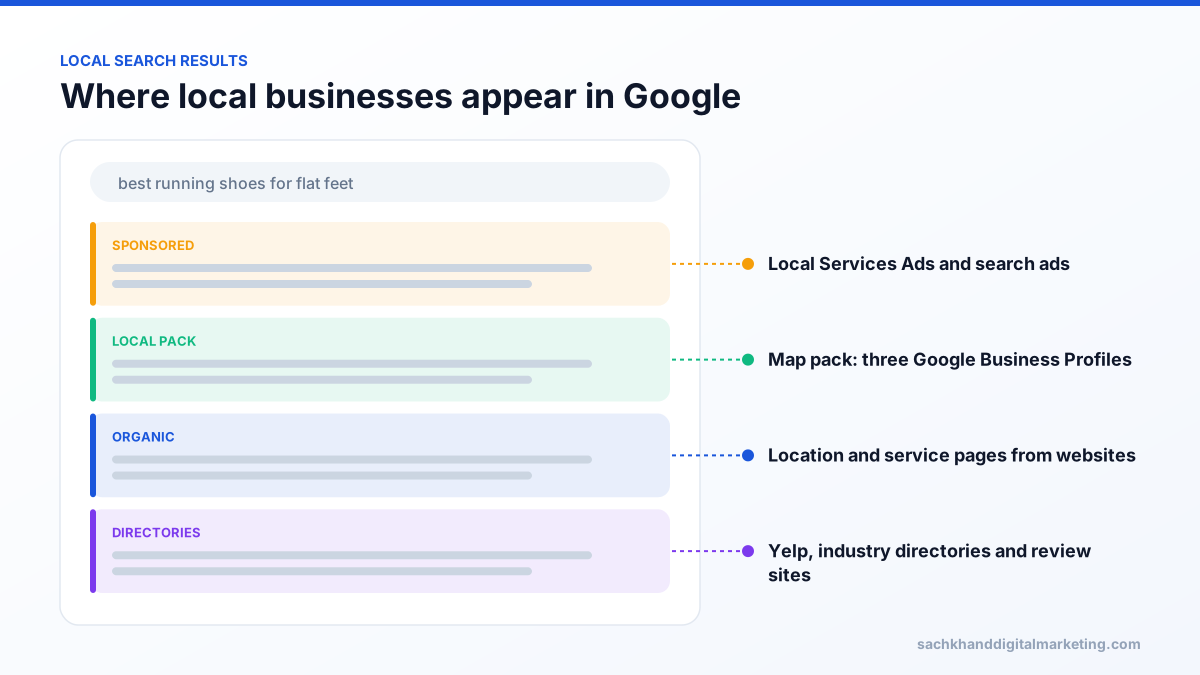
Local searches are unusually valuable because intent is high and the decision is fast. Someone searching for a locksmith or a boiler repair usually wants to call someone within minutes, and they rarely scroll far.
How Google ranks local results
Google’s own guidance says local results are based mainly on three factors.
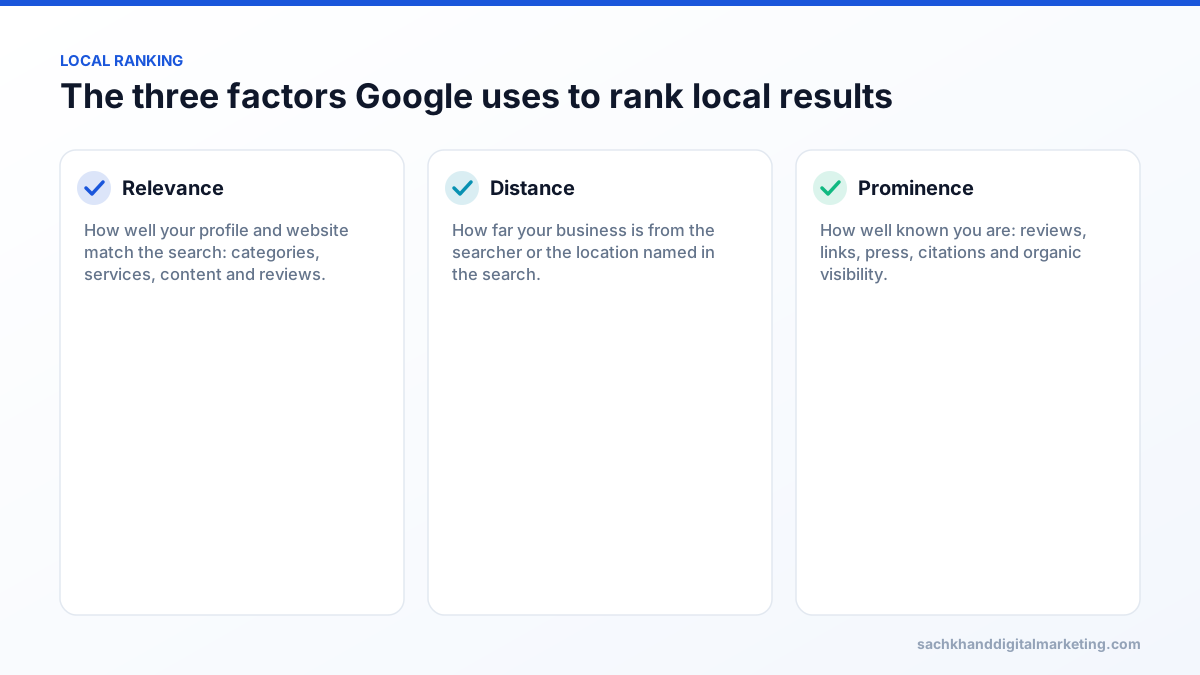
- Relevance: how well your Business Profile matches what the person is looking for. Categories, services, business description, website content and review text all contribute.
- Distance: how far each potential result is from the location used in the search. You cannot change where your business is, and trying to fake it with virtual offices risks suspension.
- Prominence: how well known your business is. Google considers information from across the web, including links, articles and directories, plus review count and rating, and your position in organic results.
Step 1: Optimise your Google Business Profile
Your Google Business Profile is the single most important local SEO asset. The essentials:
- Claim and verify the profile, with the owner as primary owner and staff or agencies as managers.
- Use your real business name exactly as it appears on signage. Adding keywords or locations breaks Google’s guidelines and is a common cause of suspension.
- Choose the most specific primary category for your main service, then add genuinely relevant secondary categories.
- Set your address or service areas correctly. Service-area businesses that do not serve customers at their premises should hide the address.
- Complete services, products, hours, attributes and description. Most competitors leave these half-empty.
- Add real photos regularly: exterior, interior, team, vehicles and completed work.
- Publish posts for offers, events and seasonal services.
Our full Google Business Profile optimisation checklist walks through all 13 steps.
Step 2: Build a review engine
Reviews influence both prominence and whether searchers choose you. Review count, average rating and recency all matter, and the text of reviews that mention specific services and places can reinforce relevance.
- Ask at the moment of highest satisfaction, usually right after a job is completed, with a direct link to your review form sent by SMS or email.
- Ask every customer. Selectively asking only happy customers (review gating) breaks Google’s policies.
- Never buy reviews or offer incentives. Fake reviews are against Google’s policies and are illegal in many countries, including under the US FTC rule on fake reviews.
- Reply to every review, positive and negative. A calm, helpful response to criticism is read by every future customer.
- Aim for a steady flow rather than bursts. A business with regular recent reviews looks more active and trustworthy than one with many old ones.
Train technicians or front-desk staff to mention reviews in person, then send the link within the hour. Personal asks followed by an immediate link consistently outperform generic monthly email requests.
Step 3: Get your citations and NAP consistent
Citations are mentions of your business name, address and phone number (NAP) on other websites: data aggregators, directories, social profiles, industry associations and chambers of commerce. Consistency matters more than volume.
- Standardise one format for your name, address and phone number, and use it everywhere.
- Fix major data sources first: Apple Business Connect, Bing Places, Facebook, Yelp and the leading directories in your country and industry.
- Find and correct old addresses and phone numbers after a move or rebrand.
- Remove or merge duplicate listings.
- Prioritise relevant, reputable directories over hundreds of low-quality ones.
Step 4: Create location and service pages that deserve to rank
Your website supports local rankings in two ways: the page linked from your Business Profile contributes to relevance, and dedicated pages can rank in organic results for location and service searches.
Service pages
Create a separate page for each core service, for example “boiler repair”, “boiler installation” and “annual boiler service”, rather than one page listing everything. Explain the service, pricing guidance, process, guarantees, FAQs and proof such as reviews and photos.
Location pages
If you serve multiple towns or neighbourhoods, a page per priority area can rank for “service + location” searches, but only if it contains genuinely local information. The pattern that fails is a template with the town name swapped, which Google treats as doorway pages.
- Projects completed in that area, with photos and details.
- Local considerations: housing stock, regulations, common problems, parking or access.
- Reviews from customers in that area.
- Staff or teams who cover it, response times and service hours.
- An embedded map and directions for storefront locations.
On-page local signals
- Include the location naturally in title tags, H1s and content.
- Show your NAP consistently in the footer or contact page.
- Add LocalBusiness (or a more specific type) structured data that matches your Business Profile.
- Link between related service and location pages.
Get a prioritised action plan from our specialists, free.
Step 5: Earn local links and mentions
Links from locally relevant websites are strong prominence signals and are often easier to earn than national links:
- Sponsor local sports teams, charities, schools and events.
- Join the chamber of commerce and trade associations.
- Offer expert comment to local news sites and radio.
- Partner with complementary businesses, such as a plumber and a kitchen fitter, for referral pages.
- Publish local data or guides, such as average energy costs by neighbourhood.
- Host or speak at community workshops.
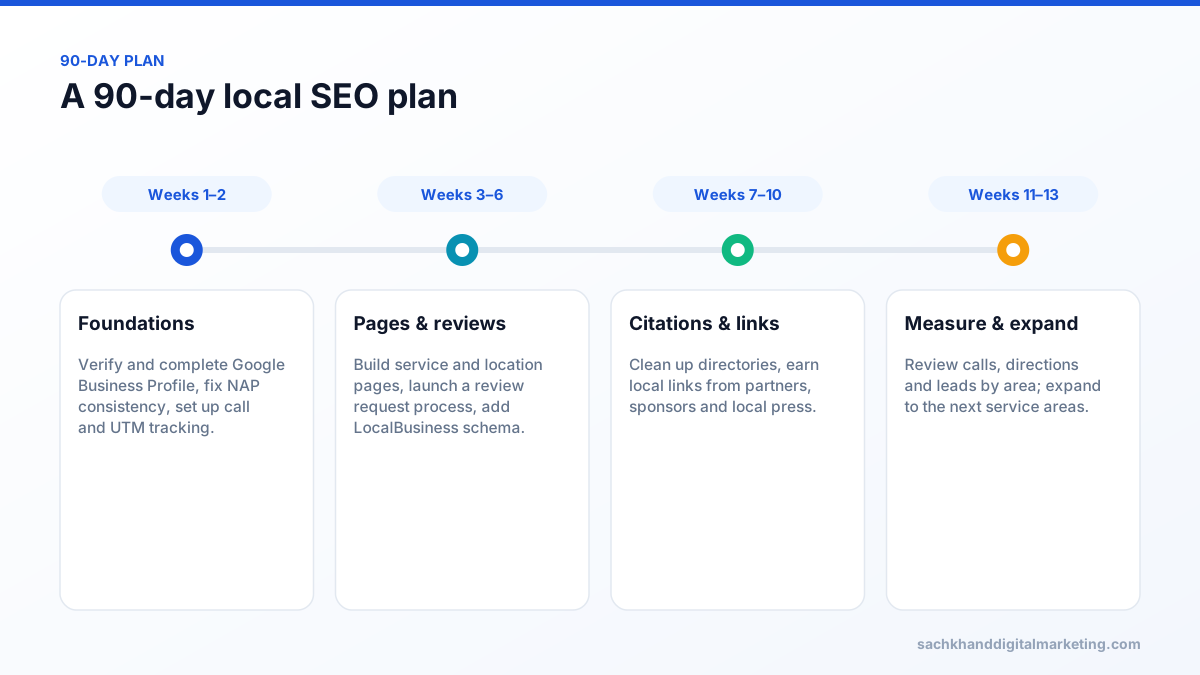
Your first 90 days
Measuring local SEO
Rankings in the local pack vary street by street, so a single “rank” number is misleading. Track:
| Metric | Source | What it tells you |
|---|---|---|
| Calls, direction requests, website clicks | Google Business Profile Performance | Actions taken from your profile |
| Searches that found your profile | Google Business Profile Performance | Which queries you appear for |
| Map pack visibility across a grid | Local rank tracking tools | How visibility changes across your service area |
| Organic traffic to location and service pages | Search Console, analytics | Website-driven local demand |
| Tracked calls, forms and booked jobs | Call tracking, CRM | Real leads and revenue by area |
Tag the website link in your Business Profile with UTM parameters so profile traffic is reported separately from organic results.
Multi-location businesses
Everything above applies per location. Each genuine location needs its own verified Business Profile, a dedicated landing page with that branch’s details, and its own review flow so every branch builds recency and prominence. Centralise brand standards but let each location show local proof: staff, photos, projects and reviews. Keep NAP data synchronised across every profile and directory, because inconsistency multiplies quickly across dozens of locations.
Common local SEO mistakes
- Keyword-stuffed business names or fake locations.
- Choosing a broad primary category instead of the most specific one.
- Duplicate location pages with only the town name changed.
- Letting reviews stall or ignoring negative ones.
- Different phone numbers across directories and the website.
- Linking the Business Profile to a generic homepage for a multi-location business.
Frequently asked questions
How long does local SEO take to work?
Google Business Profile optimisation and review improvements can move map pack visibility within a few weeks. Location pages, citations and local links typically take three to six months to show their full effect, depending on competition.
What is the Google local pack?
The local pack, or map pack, is the block of three business listings with a map that Google shows for searches with local intent. Listings come from Google Business Profiles rather than websites.
Does my Google Business Profile affect local rankings?
Yes. It is the main source of information for the local pack. Categories, completeness, accuracy, reviews and activity all influence relevance and prominence.
Do I need a physical address for local SEO?
You need a real business location to verify a Google Business Profile, but service-area businesses can hide their address and list the areas they serve. Virtual offices and mailbox addresses are not allowed.
How many reviews do I need to rank in the map pack?
There is no fixed number. Compare yourself with the businesses already ranking for your main searches, aim to match or exceed their review count and rating over time, and focus on a steady flow of recent reviews.
Want to dominate your city in Google Maps and the local pack?
Talk to our team about your goals. We will show you where the biggest wins are, starting with a free, no-obligation audit.