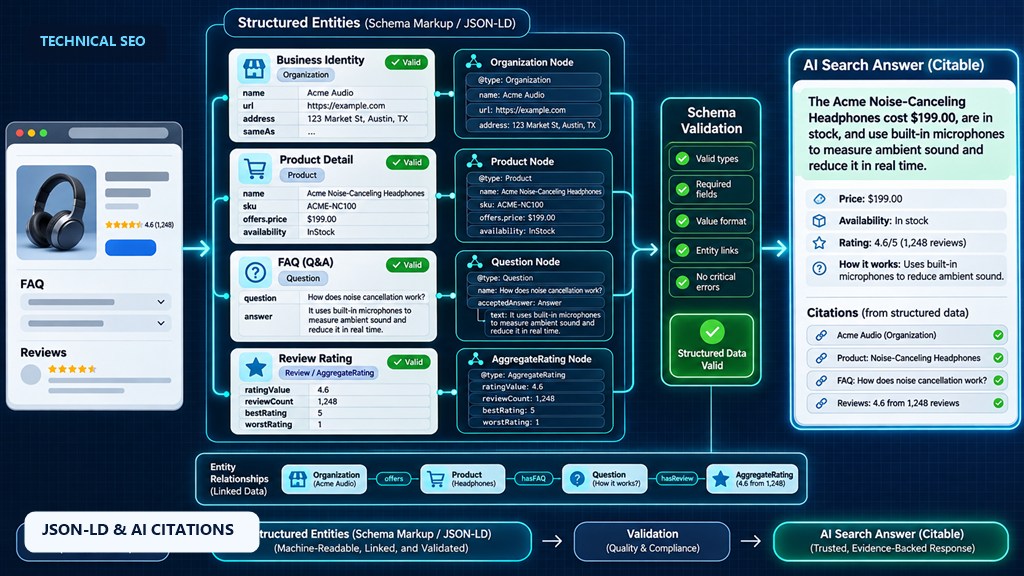
Schema markup does not guarantee a place in Google AI Overviews or ChatGPT answers. Google says no special markup is needed for AI features. What structured data does is state facts in a machine-readable form: who the organisation is, who wrote a page, what a product costs and whether it is in stock. That reduces ambiguity, supports rich results and keeps your entity consistent across systems. Prioritise Organization, Person, Article, Product and LocalBusiness, connect them with @id and sameAs, and make every value match what is visible on the page.
On this page
- Does schema help you appear in AI answers?
- How search engines and AI use structured data
- The schema types to prioritise
- What happened to FAQ and HowTo rich results
- Build a connected entity graph
- JSON-LD example
- Schema mistakes to avoid
- How to test and monitor schema
- Schema checklist for AI search
- Frequently asked questions
“Add schema to get into AI Overviews” has become one of the most repeated pieces of AI search advice. It is half right. Structured data is useful, but not in the way most people think, and some of the markup businesses add is ignored or even risky.
This guide explains what schema markup really does for AI search in 2026, which types are worth your time, and how to implement them so they help rather than hurt.
Does schema markup help you appear in AI Overviews?
Not directly. Google says there is no special schema or structured data needed to appear in AI Overviews or AI Mode, and adding schema does not guarantee inclusion. Structured data helps indirectly: it makes facts about your business, authors and products unambiguous, which helps search engines understand and trust your content and supports rich results.
Google’s guidance for AI search experiences recommends making sure structured data matches the visible content of the page. Microsoft has gone further: Bing representatives have said publicly that schema markup helps Microsoft’s large language models understand web content for Copilot. For ChatGPT and Perplexity there is no public statement either way, and their crawlers mostly read the visible text of the page.
How search engines and AI systems use structured data
- Understanding entities. Organization, Person and LocalBusiness markup confirm who you are and connect your site to your profiles elsewhere, which feeds systems like Google’s Knowledge Graph.
- Exact facts. Prices, availability, ratings, opening hours, dates and authors are easier to extract correctly from structured data than from page layout.
- Rich results. Product, review, breadcrumb, video, event and recipe markup can still earn enhanced listings in Google, which improve click-through rates.
- Shopping surfaces. Product data from structured data and Merchant Center can appear in Google’s shopping results and AI shopping experiences.
What structured data cannot do is make thin or unoriginal content worth citing. It describes your page; it does not replace it.
The schema types to prioritise
| Schema type | Use it for | Why it matters for AI search |
|---|---|---|
| Organization | Your homepage or about page | Defines your brand, logo, contact details and official profiles via sameAs |
| Person | Authors and experts | Connects content to real people with job titles and credentials, supporting E-E-A-T |
| Article / BlogPosting | Guides, news and blog posts | States the author, publisher and publish and update dates, which matter for freshness |
| Product + Offer | Product pages | Price, availability, shipping and returns in a form shopping systems can read |
| LocalBusiness | Physical locations | Address, hours and service area for “near me” answers; keep it identical to your Business Profile |
| Service | Service pages | Describes what you offer, where and who provides it |
| BreadcrumbList | Every interior page | Shows how the page fits your site’s structure |
| FAQPage | Pages with visible FAQs | Rarely shows a rich result now, but labels clear question-and-answer pairs |
| VideoObject | Pages with embedded video | Title, description, duration and key moments for video results |
Ecommerce sites should also read our ecommerce schema markup guide, which covers Product variants, shipping and return policy markup in detail.
What happened to FAQ and HowTo rich results?
In August 2023 Google limited FAQ rich results to well-known, authoritative government and health websites, and stopped showing HowTo rich results. In 2025 Google also phased out several lesser-used structured data features to simplify its results pages.
FAQPage markup is still valid schema.org vocabulary, and it does no harm on a page with genuine, visible FAQs. Just do not add it expecting the expandable FAQ listing most sites used to get.
Build a connected entity graph, not isolated snippets
Many sites have schema added by several plugins, with each block describing the same company slightly differently. A better approach is one connected graph:
- Give each entity a stable
@id, such ashttps://example.com/#organization, and reference it everywhere instead of repeating the details. - Link articles to authors with
authorpointing to a Person@id, and link authors to the organisation withworksFor. - Use
sameAsto list your official profiles: LinkedIn, Crunchbase, Wikidata, YouTube, Google Business Profile and industry directories. - Keep names consistent with how you appear on those profiles, so every system resolves you to the same entity.
This is the core of entity SEO, and it is what helps both search engines and AI systems avoid confusing you with a company with a similar name.
JSON-LD example: organisation, author and article
Google recommends JSON-LD, placed in a <script type="application/ld+json"> tag. A minimal connected graph for a blog post looks like this:
{
  "@context": "https://schema.org",
  "@graph": [
    {
      "@type": "Organization",
      "@id": "https://example.com/#organization",
      "name": "Example Co",
      "url": "https://example.com/",
      "logo": "https://example.com/logo.png",
      "sameAs": [
        "https://www.linkedin.com/company/example-co",
        "https://www.wikidata.org/wiki/Q000000"
      ]
    },
    {
      "@type": "Person",
      "@id": "https://example.com/about/#jane-doe",
      "name": "Jane Doe",
      "jobTitle": "Head of SEO",
      "worksFor": { "@id": "https://example.com/#organization" }
    },
    {
      "@type": "BlogPosting",
      "headline": "How to Choose a CRM",
      "datePublished": "2026-11-18",
      "dateModified": "2026-11-18",
      "author": { "@id": "https://example.com/about/#jane-doe" },
      "publisher": { "@id": "https://example.com/#organization" }
    }
  ]
}
Schema mistakes to avoid
| Mistake | Risk |
|---|---|
| Marking up content that is not visible on the page | Breaks Google’s structured data guidelines and can lead to a manual action |
| Self-serving review stars on Organization or LocalBusiness | Google has not shown these since 2019; invented ratings risk penalties |
| Prices or stock status that differ from the page | Product rich results are removed; shoppers and AI answers see wrong information |
| Several plugins outputting conflicting Organization data | Mixed signals about your name, logo and profiles |
Stale dateModified that changes without real updates | Erodes trust in your freshness signals |
| Generic types only (WebPage everywhere) | Adds little; use the most specific type that fits |
How to test and monitor schema
- Google Rich Results Test shows which rich results a page is eligible for and flags errors.
- Schema Markup Validator (validator.schema.org) checks any schema.org type, including ones Google does not use for rich results.
- Search Console enhancement reports track errors and valid items across the whole site over time. See our Search Console guide.
- Recheck after every template or plugin change; that is when most schema breaks.
Schema checklist for AI search
- Add one Organization entity with logo, contact details and
sameAsprofiles. - Add Person markup for every author, linked from their articles.
- Add Article or BlogPosting with accurate publish and update dates.
- Add Product and Offer markup that matches live prices and stock.
- Add LocalBusiness only for real locations, matching your Business Profile.
- Add BreadcrumbList on all interior pages.
- Connect everything with
@idreferences in one graph. - Remove duplicate or conflicting markup from plugins.
- Validate with the Rich Results Test and Schema Markup Validator.
- Monitor Search Console enhancement reports monthly.
Related guides
- Ecommerce Schema Markup: Product, Offer, Review and More
- Technical SEO: The 12-Point Audit Checklist for 2026
- How to Rank in ChatGPT, Perplexity, and Google AI Overviews: A Practical GEO Guide
- How to Use Google Search Console for Technical SEO
- GEO vs SEO: What’s Actually Different in 2026
Frequently asked questions
Does schema markup help you rank in AI Overviews?
Not directly. Google says no special markup is required for AI Overviews and schema does not guarantee inclusion. It helps search engines understand your content and entities, which supports visibility indirectly.
Does ChatGPT use schema markup?
OpenAI has not said. ChatGPT search reads web pages mainly through their visible text, so the content itself matters most. Schema still helps Google and Bing, whose indexes many AI tools rely on.
Which schema types matter most for AI search?
Organization, Person, Article or BlogPosting, Product with Offer, LocalBusiness and BreadcrumbList. Connect them with @id references and list your official profiles with sameAs.
Is FAQ schema still worth adding?
It is valid and harmless on pages with genuine visible FAQs, but since August 2023 Google shows FAQ rich results only for well-known government and health sites.
What format should schema use?
Google recommends JSON-LD, added in a script tag in the page’s HTML. Microdata and RDFa are supported but harder to maintain.
How do I test schema markup?
Use Google’s Rich Results Test for rich result eligibility, the Schema Markup Validator for general schema.org checks, and Search Console enhancement reports to monitor the whole site.
Sources
Structured data that search engines and AI trust
We will audit your schema for errors, gaps and conflicts, then build a connected JSON-LD graph that matches your visible content.