Multimodal search lets people ask with an image, their voice, or both at once — point the camera and add “in blue, under fifty pounds”. Optimising for it is mostly unglamorous: original photography that shows the product clearly, descriptive alt text and surrounding context, complete product and location data, structured markup that matches the page, and fast image delivery. Voice rewards the same answer-first writing that earns AI citations. Neither has clean reporting, so measure by proxy and judge on enquiries.

On this page
- Search does not start with typing any more
- Voice and visual are two different behaviours
- How a multimodal query actually resolves
- What a visual search engine reads around your image
- Image SEO, done properly
- Product data is the other half of visual search
- Voice search: what actually matters
- Structured data for multimodal search
- What this means for local and service businesses
- Screenshots: the quiet half of visual search
- Ecommerce: a visual search readiness checklist
- Accessibility and visual search reward the same work
- Measuring voice and visual search
- Video, social and the surfaces in between
- What not to bother with
- A 90-day plan
- Frequently asked questions
Search does not start with typing any more
For most of search history, the input was a text box. That assumption is now wrong often enough to matter. People point a camera at a part they need to replace, take a photo of a plant or a rash, screenshot a sofa they liked, or simply ask a question out loud while driving. Assistants accept all of these, and increasingly accept them in combination: an image plus a spoken refinement, such as “this, but in oak, under two hundred”. This guide covers voice search SEO, visual search with Google Lens and multimodal search optimisation for 2026.
That combination is what multimodal search means — a query assembled from more than one kind of input. It matters commercially because the intent behind it is usually specific and late-stage. Somebody photographing a broken valve is not researching plumbing; they are trying to buy or fix that exact part today.
The good news for anyone dreading another discipline: there is very little genuinely new work here. Multimodal search rewards clear photography, complete product and location data, descriptive text around images, accurate structured data and fast delivery. Most sites already know they should do those things and have not.
Visual search is a matching problem. Your job is to make the match easy and the page behind it credible.
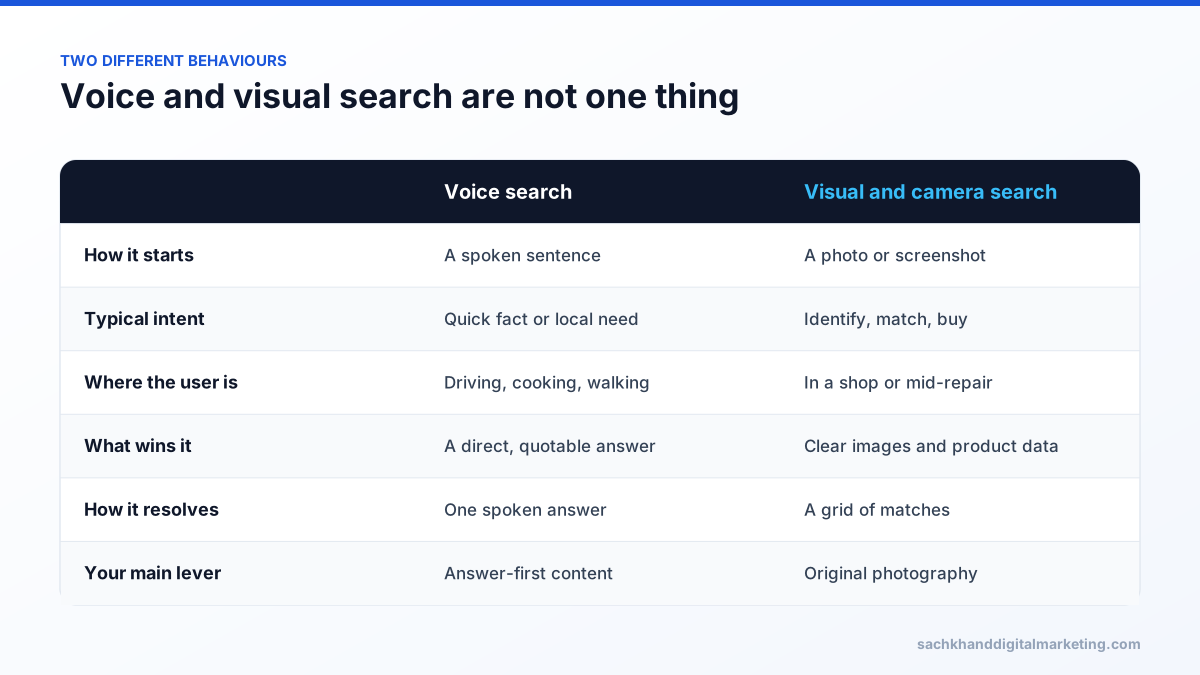
Voice and visual are two different behaviours
| Voice search | Visual and camera search | |
|---|---|---|
| How the query starts | Spoken question, full sentence | Photo, screenshot or live camera |
| Typical intent | Quick fact, local need, hands-free task | Identify, match, compare, buy |
| Context | Driving, cooking, walking, at work | In a shop, mid-repair, in front of the object |
| What wins | A direct, quotable answer; accurate local data | Clear images, product attributes, availability |
| Where it resolves | Usually one spoken answer | A grid of matches, then a page |
| Your lever | Answer-first content and profile accuracy | Image quality, product data, structured markup |
They get bundled together in strategy decks because neither involves typing. In practice they need different work, and for most businesses the visual side is now the larger opportunity — voice has been talked about for a decade and has settled into a narrow set of habits, while camera search keeps expanding into new categories.
How a multimodal query actually resolves
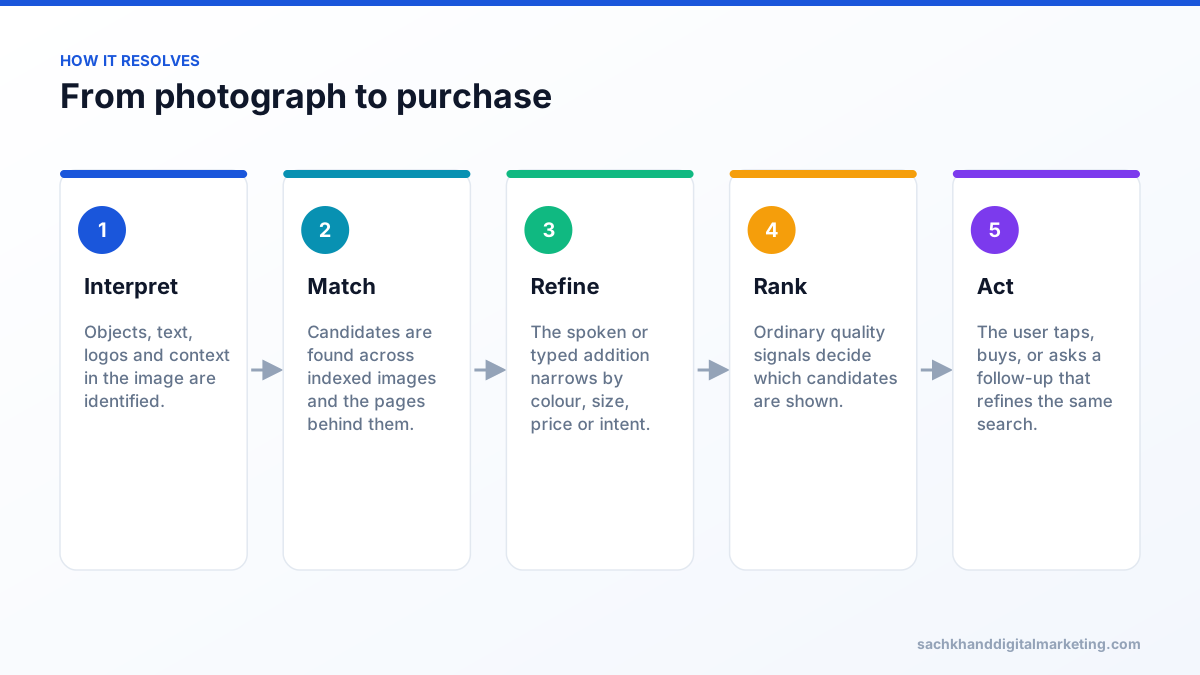
- The image is interpreted. Objects, text, logos, colours and context are identified.
- Candidates are matched against an index of images and the pages they sit on.
- Refinements are applied — the spoken or typed addition narrows the set by colour, size, price or intent.
- Results are ranked using the ordinary signals: relevance, page quality, structured data, freshness, and for local queries, proximity and profile completeness.
- The user acts — taps a result, buys, or asks a follow-up that refines the same search.
Two things follow from that sequence. First, your image has to be indexable and distinctive enough to be matched. Second, being matched is not enough: once you are a candidate, all the usual quality signals decide whether you are shown and clicked. Visual search is not a bypass around SEO; it is another front door onto the same house.
What a visual search engine reads around your image
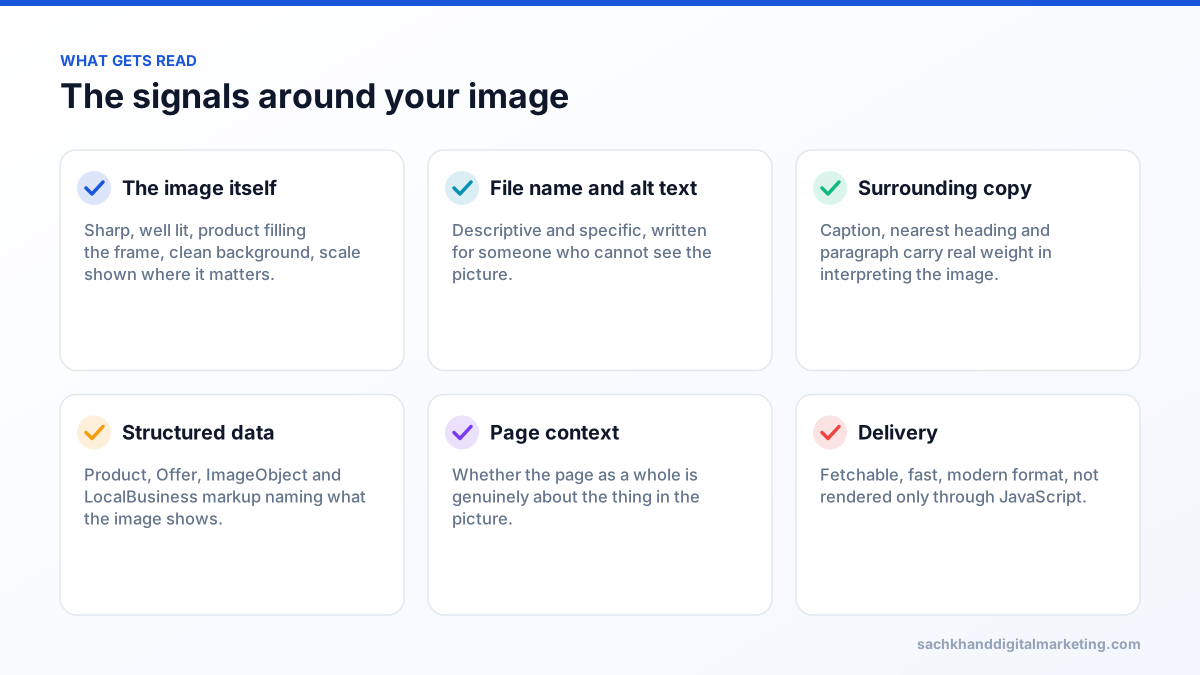
The picture is one input among several. The signals that decide whether you are matched and shown:
- The image itself. Sharp, well lit, product filling the frame, uncluttered background, scale shown where relevant.
- File name and alt text. Descriptive, specific, written for a person who cannot see the image.
- Copy immediately around the image. The caption, heading and paragraph nearest to it carry real weight in interpreting it.
- Structured data. Product, Offer, ImageObject and LocalBusiness markup that names what the image shows.
- Page context. Whether the page as a whole is genuinely about the thing in the picture.
- Delivery. Whether the image can be fetched and rendered quickly, in a supported format, at a usable resolution.
If you only fix one thing, fix original photography. Stock images shared across dozens of retailer sites are a weak matching signal and a weaker conversion asset, because there is nothing to distinguish your listing from everyone else using the same file.
Image SEO, done properly
Shoot for identification, not for mood
Atmospheric photography sells a feeling; identification photography sells the product. For anything that can be photographed by a customer, include at least one plain, well-lit image of the item against a clean background, at a natural angle, with any model or part number legible.
Write alt text a person could use
Alt text exists first for accessibility and serves search as a consequence. “Brushed brass kitchen mixer tap with pull-out spray, 200mm spout” is useful to a screen reader user and to an index. “tap-image-4-final” is useful to nobody.
Give the image somewhere to live
An image on a page that is actually about that subject will always outperform the same image on a generic gallery. Captions help, surrounding copy helps, and a dedicated page per product or service helps most.
Keep them fetchable
Modern formats, sensible dimensions, explicit width and height, lazy loading below the fold only, and no blocking of image paths in robots.txt. Also make sure images are not rendered exclusively through JavaScript that the crawler never executes. The Core Web Vitals guide covers the delivery side in detail.
Do not strip everything
Compression that removes all metadata also removes licensing and creator information that some surfaces use. Keep the fields that identify the image as yours.
Product data is the other half of visual search
For retail, the image gets you matched and the data decides whether you are shown as a buyable option. The fields that matter most are the ones brands most often leave incomplete:
- Identifiers — GTIN, MPN, brand. Without these, matching your product to the same product elsewhere is guesswork.
- Attributes — colour, size, material, capacity, compatibility, pack quantity, stated in fields rather than buried in prose.
- Price and availability kept accurate in both markup and feed, because stale offers get filtered out.
- Variant structure that does not fragment reviews or leave dead pages for retired options.
- Shipping and returns, which increasingly appear as comparison criteria in shopping surfaces.
This is the same discipline as ecommerce SEO and the same data that AI agents rely on when comparing options. Fix it once and three channels improve.
Voice search: what actually matters
Voice has settled into a narrower set of behaviours than the 2017 predictions suggested. It is used heavily for quick facts, hands-free tasks, local needs and simple transactions, and much less for considered research. Optimise for those, not for a hypothetical future.
- Answer first. A spoken answer is usually one or two sentences. Content that states the answer plainly at the top is far more quotable than content that builds to it.
- Write questions as people say them. Full sentences, natural phrasing, including the awkward ones customers actually use.
- Get the local data perfect. Hours, address, phone, service areas and categories on your Google Business Profile — voice queries lean heavily on this.
- Cover the “near me” and “open now” cases, which are answered from profile data rather than from your site copy.
- Keep sentences readable aloud. If a paragraph is hard to read out, it is hard to quote.
The overlap with answer engine optimisation is nearly total, which is convenient: content written to be cited by an assistant is already content written to be spoken.
Structured data for multimodal search
| Type | What it clarifies | Where it pays |
|---|---|---|
| Product and Offer | What the item is, its identifiers, price and availability | Camera and shopping searches |
| ImageObject | What an image depicts, its licence and creator | Image surfaces and attribution |
| LocalBusiness | Who you are, where, when you are open | Voice and “near me” queries |
| Service and areaServed | What you do and where you do it | Spoken service requests |
| FAQPage | Question and answer pairs | Voice answers and AI citations |
| BreadcrumbList | Where the page sits in your site | Result presentation and navigation |
The rule that governs all of it: markup must match what a human sees on the page. Structured data that contradicts the visible content is worse than none, because it undermines trust in everything else you declare.
Get a prioritised action plan from our specialists, free.
What this means for local and service businesses
Camera search is not only a retail behaviour. Customers photograph the thing that is broken: a boiler badge, a leaking valve, a cracked tile, a plant that is dying, a part they need matched. That is a service enquiry arriving as an image.
- Photograph your work. Real jobs, real equipment, clearly lit, with the brand and model visible where relevant.
- Name what is in the photo in the caption and the surrounding copy, including model numbers and common faults.
- Build pages for the problems people photograph, not only for the services you sell. “What this error code means” earns visits that “boiler repair” does not.
- Keep your profile photos current. They are the images most often surfaced for your business, and the ones most often years out of date.
- Answer in text what the image implies. The identification is the start of the enquiry; the next line should be what to do about it.
This is where local SEO and visual search meet. The businesses that win these queries are usually not the biggest; they are the ones with a page and a photograph for the exact problem.
Screenshots: the quiet half of visual search
Not every visual query starts with a camera. A great many start with a screenshot — a product spotted in a video, an outfit in a social post, a chart in an article, an error message in an app. The user crops it and asks what it is or where to buy it.
That behaviour has two consequences worth planning for. Your product images circulate far beyond your own site, so the version people screenshot may be a retailer’s, an influencer’s or a competitor’s. And the screenshot often contains text, which means any wording baked into an image can become part of the query.
- Keep your product visible in partner and retailer imagery, with the brand legible rather than cropped out.
- Put readable text in images where it helps identification — model names, sizes, key specifications — while keeping the same facts in HTML for everything else.
- Do not rely on text in images for anything important. It is a bonus signal for matching, never a substitute for real content.
- Watch for outdated images in circulation: discontinued packaging or old pricing screenshots can outlive the product by years.
Ecommerce: a visual search readiness checklist
- At least one clean identification image per product, shot originally by you.
- Multiple angles, plus a scale reference for anything where size is a question.
- Descriptive alt text on every product image, written for a screen reader user.
- Identifiers complete: brand, GTIN and MPN populated for every variant.
- Attributes structured as fields — colour, size, material, compatibility, pack size.
- Product and Offer markup matching the visible price, availability and variant.
- Images served in a modern format, correctly sized, with width and height set.
- No image paths blocked in robots.txt, and no images that exist only after JavaScript runs.
- Variants consolidated so reviews and authority are not split across near-duplicates.
- Discontinued products handled deliberately rather than left as dead pages.
Ten items, most of which a developer and a photographer can clear in a fortnight. Nothing on the list is exotic, which is precisely why it is worth doing — your competitors are also treating visual search as a future problem.
Accessibility and visual search reward the same work
There is a pleasant symmetry here that makes the business case easier. Almost everything that helps a machine interpret your images also helps a person using a screen reader, and vice versa.
- Descriptive alt text serves both audiences identically.
- Captions and surrounding context help anyone who cannot see the image, human or machine.
- Text in HTML rather than baked into graphics is readable by assistive technology, crawlers and AI agents alike.
- Clear heading structure makes the page navigable and makes the image’s subject unambiguous.
- Sensible image sizes reduce load time for everyone, particularly on poor mobile connections.
If you need to justify the work internally, this is the argument that lands: it is accessibility compliance, page performance, technical SEO and visual search readiness funded as a single project rather than four.
Measuring voice and visual search
Reporting here is genuinely poor, and any agency promising you a clean “voice search ranking” is selling something. Measure by proxy, and say plainly which numbers are estimates.
- Image search performance in Search Console, filtered by search type, is the most direct data available.
- Question-shaped queries — who, what, where, how, near me — as a rising share of your impressions.
- Profile interactions: calls, direction requests and photo views on your business profile.
- Enquiries that arrive with a photo attached, which is a direct behavioural signal your form should allow.
- A monthly manual check: photograph five of your own products or common faults and see what comes back.
That last habit is the most useful one on the list. It takes ten minutes, it shows you exactly which competitor is matched instead of you, and it tends to reveal an image problem that no report would have surfaced.
Video, social and the surfaces in between
Multimodal behaviour is not confined to search engines. People increasingly search inside social apps, ask assistants about things they saw in a video, and use in-app camera features to shop. The content you publish elsewhere is now part of your visual search footprint.
- Show the product clearly in video, not only in motion. A steady, well-lit frame is what gets screenshotted and searched.
- Keep naming consistent across your site, marketplaces and social posts, so the same product resolves to one thing rather than three.
- Caption and describe uploads properly; the text around a video contributes to how its frames are understood.
- Make the product findable after the discovery — a searchable model name beats a campaign nickname nobody can type.
- Expect the journey to break across platforms. Someone sees it on social, photographs it later, buys somewhere else entirely. Consistency is what keeps you in that chain.
You cannot control every surface, and trying to optimise for each one separately is a good way to waste a year. Control the two things that travel with your product everywhere: the image and the name.
What not to bother with
- “Voice search keyword” packages. There is no separate voice index to rank in, and no reliable voice rank tracking.
- Stuffing conversational phrases into copy that then reads badly for everyone.
- Schema you cannot support with visible content, which risks manual action for a speculative benefit.
- Rewriting the whole site for “natural language”. Write clearly and the natural language takes care of itself.
- Chasing every new visual surface before your product data and photography are sound. The fundamentals feed all of them.
A 90-day plan
| Weeks | Focus | Output |
|---|---|---|
| 1–2 | Audit: image quality, alt text, product data completeness, profile photos | A prioritised fix list |
| 3–6 | Reshoot or replace weak images on your top products or services | Distinctive, matchable imagery |
| 7–9 | Structured data, identifiers, attributes and delivery fixes | Machine-readable, fast-loading pages |
| 10–12 | Question-led content for the problems customers photograph; baseline the measurement | Coverage plus a way to track it |
Sequencing matters. Structured data on a page with poor photography and thin product information produces a well-described page that still loses the match. Fix what the camera sees first, then describe it properly, then measure.
One further note on expectations. This work compounds quietly rather than spiking: better images lift conversion immediately, while matching and ranking improvements appear over months as pages are recrawled and reindexed. Judge the programme on enquiries and sales from the products you fixed, compared with those you did not, rather than on any single reported metric. That comparison is easy to set up, costs nothing, and is more persuasive than any visual search dashboard currently available.
Frequently asked questions
What is multimodal search?
Multimodal search is a query built from more than one type of input — most commonly an image combined with text or speech, such as photographing a chair and adding “in green, under two hundred”. Assistants and search engines interpret the image, apply the refinement and return matches, which makes the intent unusually specific.
How do I optimise for visual search?
Use original, well-lit photography that shows the product clearly, write descriptive alt text and captions, keep product identifiers and attributes complete, add structured data that matches the page, and make sure images load fast and are not blocked or rendered only through JavaScript. Matching is the first hurdle; ordinary page quality decides the rest.
Is voice search still worth optimising for?
Yes, but narrowly. Voice is used mostly for quick facts, hands-free tasks and local needs, so the work that pays is answer-first content, natural question phrasing and accurate business profile data. There is no separate voice index to rank in, so treat “voice search packages” with scepticism.
Does alt text still matter for SEO?
It does, and it matters more as visual search grows. Alt text exists first for accessibility, and the same descriptive specificity that helps a screen reader user helps an index interpret what the image shows. Write it for a person who cannot see the picture, not as a place to put keywords.
Can I rank in Google Lens results?
There is no separate ranking to buy or track. Being returned for a camera query depends on your images being indexable and distinctive, the page genuinely being about the item, and your product data being complete. In practice, original photography and complete attributes do most of the work.
Do stock images hurt visual search performance?
They weaken it. An image shared across dozens of sites gives a matching system nothing to distinguish you by, and it gives shoppers no reason to choose your listing. Original photography of your actual products or work is one of the highest-return investments in this area.
What structured data helps with voice and visual search?
Product and Offer for items, ImageObject for images, LocalBusiness and opening hours for spoken local queries, Service with areaServed for service businesses, and FAQPage for question-and-answer content. Every value must match what is visible on the page.
How do I measure visual search traffic?
Use the image search type in Search Console as the most direct available data, and track question-shaped queries, business profile interactions and enquiries that arrive with photos attached. There is no complete report, so label estimates as estimates and judge the work on enquiries.
Does multimodal search affect local businesses?
Significantly. Customers photograph the broken thing — a boiler badge, a leaking valve, a cracked tile — which turns an image into a service enquiry. Businesses with real photographs of that equipment, pages about those specific faults and an accurate profile win these queries regularly.
Is optimising for AI assistants the same as optimising for voice?
They overlap almost completely. Both reward a direct answer stated early, clear structure, specific facts and accurate business data. Content written to be cited by an assistant is already content that can be read aloud, so the two programmes should be run as one.
Are your images and product data ready to be matched?
Our free audit covers image SEO, structured data and product information — the three things visual and voice search actually depend on.